What is Track Change GPT ai chrome extension?
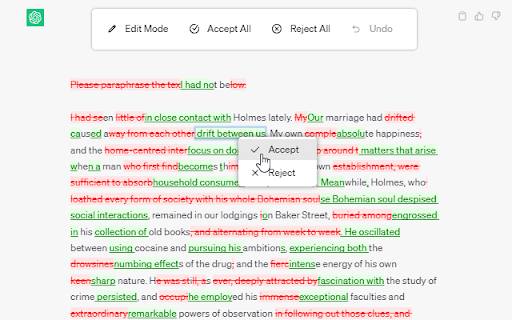
Track Change GPT is a lightweight, intelligent Chrome extension designed specifically for ChatGPT users who need precision and transparency in content refinement. Unlike basic copy-paste workflows, it overlays real-time change tracking—highlighting additions, deletions, and rewrites made by the AI—so you retain full editorial control over every revision. Think of it as “Google Docs' track changes,” but purpose-built for AI-assisted conversations.
How to use Track Change GPT ai chrome extension?
Simply install the extension and activate it with one click on any ChatGPT chat window. The Track Change toggle switches between live editing mode and clean view. Hover over highlighted segments to preview differences, click to accept or reject individual edits, and use the floating action panel for bulk actions—Accept All, Reject All, Reset Session, or step backward with granular Undo. No setup, no login—just intuitive, context-aware revision control.