Track Change GPT - Chrome Extension

Track Change GPT - Chrome Extension: AI Tool

Track Change GPT - Chrome Extension: An AI tool for tracking changes in ChatGPT content—real-time edits, version control, and seamless collaboration.

🟢

Track Change GPT - Chrome Extension - Introduction

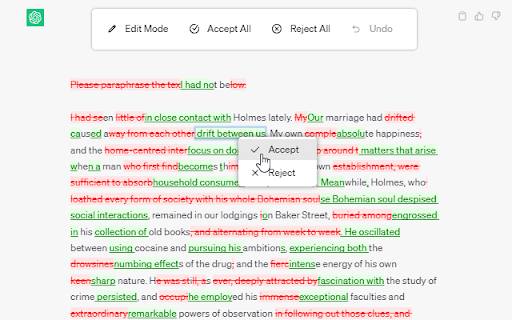
Track Change GPT - Chrome Extension Website screenshot

What is Track Change GPT ai chrome extension?

Track Change GPT is a lightweight, intelligent Chrome extension designed specifically for ChatGPT users who need precision and transparency in content refinement. Unlike basic copy-paste workflows, it overlays real-time change tracking—highlighting additions, deletions, and rewrites made by the AI—so you retain full editorial control over every revision. Think of it as “Google Docs' track changes,” but purpose-built for AI-assisted conversations.

How to use Track Change GPT ai chrome extension?

Simply install the extension and activate it with one click on any ChatGPT chat window. The Track Change toggle switches between live editing mode and clean view. Hover over highlighted segments to preview differences, click to accept or reject individual edits, and use the floating action panel for bulk actions—Accept All, Reject All, Reset Session, or step backward with granular Undo. No setup, no login—just intuitive, context-aware revision control.

🟢

Track Change GPT - Chrome Extension - Key Features

Key Features From Track Change GPT ai chrome extension

Real-time AI edit detection

Side-by-side revision comparison

Intelligent color-coded annotations (green = added, red = removed, blue = reformulated)

Inline decision prompts—accept, reject, or edit in place

Version snapshot history per conversation thread

Native support for 20+ languages—including right-to-left and CJK scripts

Track Change GPT ai chrome extension's Use Cases

Auditing AI output for accuracy, tone, and compliance

Collaborative drafting with stakeholders who review AI-generated drafts

Academic writing: preserving original intent while integrating AI suggestions

Content localization—tracking how translations or adaptations differ from source

Training custom LLM prompts by analyzing iterative refinement patterns

🟢

Track Change GPT - Chrome Extension - Frequently Asked Questions

FAQ from Track Change GPT - Chrome Extension

What is Track Change GPT?

Track Change GPT is an AI-native Chrome extension that brings professional-grade version awareness to ChatGPT interactions—capturing *how* and *where* AI modifies your input in real time, so you stay author, not observer.

How to use Track Change GPT?

After installation, click the extension icon to enable tracking. Edits appear instantly as annotated highlights. Use contextual clicks or the command menu to curate changes—no switching tabs or exporting logs required.

How do I turn off the track change functionality?

Click the Track Change button again—or press `Ctrl+Shift+T` (Windows/Linux) / `Cmd+Shift+T` (Mac)—to disable annotation mode instantly. Your chat remains fully functional; only visual tracking pauses.