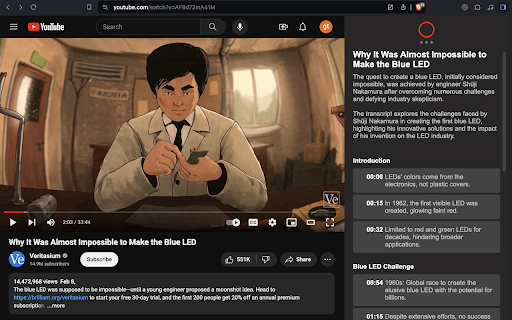
What is YouTube VideoSynth ai chrome extension?
YouTube VideoSynth is an intelligent Chrome extension that transforms how you interact with YouTube videos—using cutting-edge AI to distill hours of content into clear, structured summaries. Powered by LLMs including GPT-4, GPT-3.5, and Claude, it delivers real-time chapter-based breakdowns, multilingual support, and intuitive navigation—all without requiring premium API keys or subscriptions.
How to use YouTube VideoSynth ai chrome extension?
Install the extension from the Chrome Web Store, then launch any YouTube video. Click the VideoSynth icon to generate a smart summary—no login needed for basic functionality. For advanced options (e.g., longer summaries or custom language), connect your free-tier API keys from OpenAI or Anthropic in one click. Everything works directly on the YouTube page—no tab switching or copy-pasting required.
YouTube VideoSynth ai chrome extension's Core Features
AI-generated chapter-by-chapter video breakdowns
One-click jump-to-timestamp navigation from bullet points
Customizable keyboard shortcuts to toggle and resize the AI sidebar
Flexible output control: choose language, depth (concise/detailed), and format (bullets/chapters)
Native integration with GPT-3.5, GPT-4, and Claude 3 models—no model lock-in
YouTube VideoSynth ai chrome extension's Use Cases
Cut through lengthy tutorials, lectures, or reviews in seconds
Verify misleading thumbnails or sensational titles before watching
FAQ from YouTube VideoSynth - Chrome Extension
What is YouTube VideoSynth?
An AI-powered Chrome extension designed specifically for YouTube—turning passive watching into active learning by transforming videos into navigable, summarized, and searchable experiences using state-of-the-art language models.
How to use YouTube VideoSynth?
After installation, simply open a YouTube video, click the extension icon, and let VideoSynth auto-generate a contextual summary. Optional API connections unlock enhanced customization—fully optional and privacy-respecting.
How to access YouTube VideoSynth tool?
Download the free extension from the Chrome Web Store, pin it to your toolbar, and start using it instantly on any YouTube video—no signup, no trial period, no hidden paywalls.