What is Talkingvet® Chrome Extension ai chrome extension?
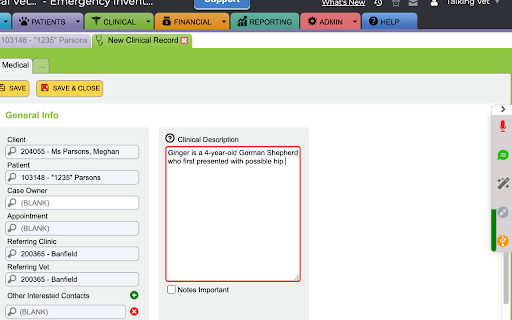
Talkingvet® Chrome Extension is an AI-powered voice-to-text tool purpose-built for veterinary professionals. Leveraging nVoq's specialized veterinary speech recognition engine, it transforms spoken clinical observations into accurate, structured notes directly within any web-based practice management system or EMR — all without typing or switching apps.
How to use Talkingvet® Chrome Extension ai chrome extension?
Simply install the extension, grant microphone access, and begin speaking — whether you're at your desk using a professional dictation device or on the go with your smartphone. Trigger custom phrases to insert standardized terminology, launch pre-built SOAP templates, navigate forms, or execute multi-step actions — all through natural, context-aware voice commands.
Talkingvet® Chrome Extension ai chrome extension's Core Features
Veterinary-specific AI speech recognition — trained on real clinical language
Intelligent voice command system with zero-touch workflow control
Fully customizable templates for exams, procedures, discharge instructions, and more
Chain-command automation for repetitive documentation tasks
Talkingvet® Chrome Extension ai chrome extension's Use Cases
Drafting precise, compliant veterinary medical records in seconds
Populating EHR fields, SOAP notes, and client communications hands-free
Reducing documentation burden during high-volume patient visits
FAQ from Talkingvet® Chrome Extension - Chrome Extension
What is Talkingvet® Chrome Extension?
Talkingvet® Chrome Extension is an AI-driven voice documentation tool designed exclusively for veterinarians. It integrates seamlessly with web-based platforms to convert clinical speech into accurate, actionable notes — powered by nVoq’s veterinary-trained language model and optimized for speed, accuracy, and workflow continuity.
How to use Talkingvet® Chrome Extension?
After installation, activate the extension via keyboard shortcut or toolbar icon. Speak clearly into any compatible microphone — including smartphones (iOS/Android), Philips SpeechMike Premium, Nuance PowerMic series, or studio-grade USB mics — then use intuitive voice commands to dictate, insert content, open templates, and streamline documentation.
What devices are supported by the Talkingvet® Chrome Extension?
The extension supports a wide range of audio input devices: iPhones and Android smartphones, Philips SpeechMike Premium, Nuance PowerMic II, III, and 4, as well as most USB and Bluetooth microphones with stable latency and clear audio fidelity — ensuring reliable performance across diverse clinical environments.