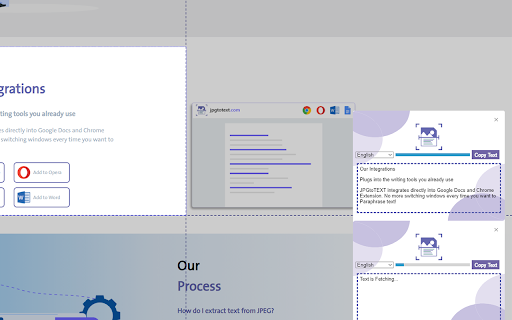
What is Image to Text Converter ai chrome extension?
A powerful, lightweight Chrome extension powered by AI-driven OCR that transforms text embedded in images—whether screenshots, photos, or web-captured visuals—into fully editable, copyable, and searchable text—all within your browser, no downloads or uploads required.
How to use Image to Text Converter ai chrome extension?
Click the extension icon while on any webpage or image, select a region—or capture the entire visible tab—and let the AI instantly analyze and transcribe the text. Results appear in seconds, ready for editing, sharing, or exporting.
Image to Text Converter ai chrome extension's Core Features
Intelligent AI-powered OCR
One-click image-to-text conversion
Real-time extraction without leaving the browser
Image to Text Converter ai chrome extension's Use Cases
Digitizing printed or scanned documents (PDFs, receipts, forms)
Pulling quotes, captions, or labels from social media posts and infographics
Assisting students and researchers with textbook screenshots and academic visuals
FAQ from Image to Text Converter - Chrome Extension
What is Image to Text Converter?
A smart, privacy-conscious Chrome extension that uses advanced optical character recognition and AI models to detect and convert text from images into plain, editable text—directly in your browser.
How to use Image to Text Converter?
Install the extension, click its icon on any page, choose “Capture Tab” or “Select Area”, then watch as it processes and delivers clean, formatted text in under 2 seconds.
How accurate is the text extraction process?
Delivers industry-leading accuracy—especially on clear, high-resolution images and standard fonts—while intelligently handling common challenges like slight skew, background noise, and multi-language text.