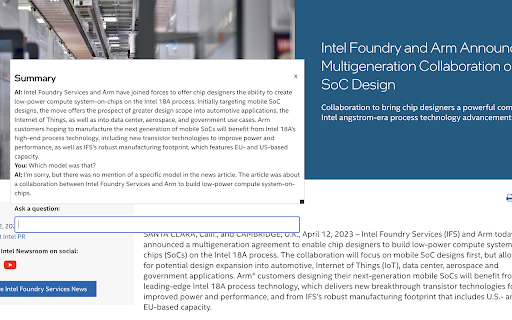
What is GPT API Companion ai chrome extension?
GPT API Companion is a lightweight, privacy-conscious Chrome extension that leverages the power of OpenAI's GPT models directly in your browser—enabling instant, intelligent summarization of any webpage and contextual Q&A—all without leaving the site you’re on.
How to use GPT API Companion ai chrome extension?
Simply install the extension from the Chrome Web Store, obtain your OpenAI API key at platform.openai.com/account/api-keys, then securely input it via the extension’s settings page at chat.lit.codes/options. No sign-up or account required—your key stays encrypted and local to your browser.
GPT API Companion ai chrome extension's Core Features
One-click page or selection summarization
Real-time, context-aware questioning powered by GPT
GPT API Companion ai chrome extension's Use Cases
Condense long articles, documentation, or news into concise insights
Clarify complex content—ask follow-ups, request explanations, or extract key takeaways
FAQ from GPT API Companion - Chrome Extension
What is GPT API Companion?
A secure, browser-native AI assistant that transforms how you interact with web content—summarizing pages instantly and answering nuanced questions using your own GPT API credentials.
How to use GPT API Companion?
After installing the extension, generate an API key from OpenAI, then paste it into the dedicated settings interface at chat.lit.codes/options. The extension handles the rest—no backend, no tracking, no external servers involved.
Is personal information stored?
No. Your API key is stored exclusively in Chrome’s local storage—never transmitted or logged. Chat interactions are processed client-side where possible, and full conversation history remains end-to-end encrypted and private to your device.