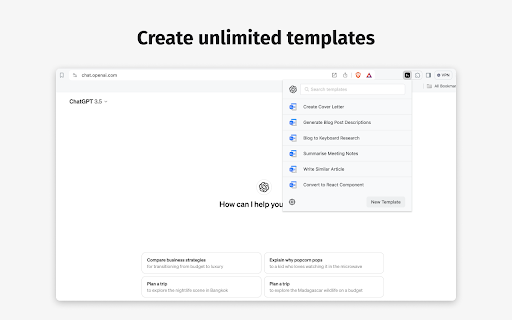
What is AI Prompt Template Builder ai chrome extension?
Transform how you interact with AI—build intelligent, reusable prompt templates in seconds, optimized for your voice, goals, and preferred chatbot platform.
How to use AI Prompt Template Builder ai chrome extension?
1. Add the AI Prompt Template Builder extension to Chrome (or Edge) in under 10 seconds. 2. Click the extension icon to launch the intuitive template studio. 3. Select your target AI—ChatGPT, Gemini, Copilot, HuggingChat, or others via custom integration. 4. Design smart prompts using tone controls, dynamic placeholders (e.g., {{topic}}, {{audience}}), and context-aware formatting. 5. One-click insert into any chat window—or auto-apply based on URL or chatbot detection.
AI Prompt Template Builder ai chrome extension's Core Features
Unlimited Prompt Templates
Smart Prefix & Suffix Engine
Tone & Style Presets (Professional, Creative, Concise, Empathetic, Technical)
Multi-Language Support (20+ languages with localized phrasing)
Dynamic Variables + Auto-Populated Fields (e.g., current date, domain, selected text)
AI Prompt Template Builder ai chrome extension's Use Cases
Marketing
Sales Outreach
Content Creation
SEO Strategy & Keyword Briefing
Team Onboarding & Internal Knowledge Sharing
Customer Success & Support Automation
FAQ from AI Prompt Template Builder - Chrome Extension
What is AI Prompt Template Builder?
A lightweight yet powerful Chrome extension that empowers users to design, store, and deploy high-conversion AI prompts—no coding, no copy-paste fatigue.
How to use AI Prompt Template Builder?
Install → Launch → Choose chatbot → Customize tone, variables, and structure → Save → Deploy instantly across supported platforms. Templates sync across devices via optional cloud backup.
What AI chatbots are supported?
Fully optimized for ChatGPT (OpenAI), Google Gemini, Microsoft Copilot, and HuggingChat—with open API support for custom LLM integrations and future-ready extensibility.