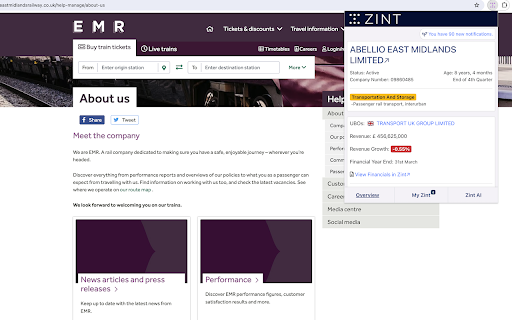
Zint - Chrome Extension

Zint - Chrome Extension: AI Tool for Real-Time Insights

Zint - Chrome Extension: AI-driven website analysis tool — a powerful ai tool for real-time insights. Zint - Chrome Extension.

🟢

Zint - Chrome Extension - Introduction

Zint - Chrome Extension Website screenshot

What is Zint - Chrome Extension?

Zint is an intelligent, browser-native AI assistant that delivers instant, contextual business intelligence — directly as you browse. Built exclusively for Chrome, it transforms static web pages into dynamic insight dashboards in real time.

How to use Zint - Chrome Extension?

Add Zint to Chrome in seconds, navigate to any company website or official registry page (e.g., Companies House, SEC filings, or corporate domains), and activate the extension with one click — unlocking live, AI-curated insights without leaving the page.

🟢

Zint - Chrome Extension - Key Features

Key Features From Zint - Chrome Extension

Live AI-powered company profiling

Tailored analysis of offerings, market positioning & growth signals

Seamless, lightweight Chrome integration — no login or setup required

Zint - Chrome Extension's Use Cases

Accelerating competitive and market research

Validating B2B prospects during outreach or due diligence

Uncovering hidden business metrics — revenue indicators, tech stack, leadership trends

🟢

Zint - Chrome Extension - Frequently Asked Questions

FAQ from Zint - Chrome Extension

What is Zint?

An AI-enhanced Chrome extension designed to surface actionable, real-time business intelligence — instantly, contextually, and securely — right inside your browser.

How to use Zint?

Install → Browse → Activate. Whether you're on a startup’s homepage or a public filing portal, Zint surfaces structured, up-to-date insights on demand.

How to install Zint Chrome Extension?

Visit the official Chrome Web Store listing, click “Add to Chrome”, and confirm — the entire process takes under 10 seconds. No account or credit card needed.