YGPT - Chrome Extension

YGPT - Chrome Extension: AI Tool for Real-Time Video Assessment

YGPT - Chrome Extension: An AI tool for real-time video assessment using OpenAI GPT—seamlessly integrated, intelligent, and instant.

🟢

YGPT - Chrome Extension - Introduction

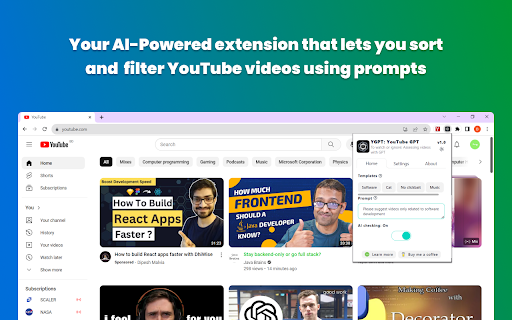
YGPT - Chrome Extension Website screenshot

What is YGPT ai chrome extension?

YGPT is a lightweight, intelligent Chrome extension that leverages OpenAI's GPT models to analyze YouTube videos in real time—evaluating titles, thumbnails, and metadata on-the-fly to help creators, researchers, and content strategists make data-informed decisions.

How to use YGPT ai chrome extension?

Install the extension, navigate to its popup interface, enter your valid OpenAI API key, enable real-time assessment mode, and browse YouTube—the AI instantly evaluates video elements as pages load, with no manual refresh or delay.

🟢

YGPT - Chrome Extension - Key Features

Key Features From YGPT ai chrome extension

Real-time GPT-powered video title scoring

Dynamic color-coded feedback based on custom AI prompts

Reusable prompt templates with one-click save/load functionality

Adaptive UI with seamless dark/light theme toggle

YGPT ai chrome extension's Use Cases

Enhancing click-through rate (CTR) analysis via visual title scoring

A/B testing multiple AI evaluation criteria across video feeds

Fine-tuning selector logic with editable XPaths for evolving YouTube layouts

Curating personalized discovery feeds using AI-driven relevance signals

🟢

YGPT - Chrome Extension - Frequently Asked Questions

FAQ from YGPT - Chrome Extension

What is YGPT?

YGPT is an AI-augmented Chrome extension designed for real-time, context-aware video assessment—bringing generative intelligence directly into your YouTube browsing experience.

How to use YGPT?

After installation, launch the extension popup, authenticate with your OpenAI API key, activate live assessment, and begin exploring YouTube—the AI analyzes each video title and metadata instantly as you scroll.

How to set up OpenAI API key for YGPT?

Visit https://platform.openai.com/api-keys, generate a new secret key (with appropriate permissions), then paste it securely into YGPT’s settings panel—no server-side storage; keys remain local to your browser.