Winston AI - Chrome Extension

Winston AI - Chrome Extension: Trusted AI Tool for Detecting ChatGPT Content

Winston AI - Chrome Extension: Trusted ai tool detecting ChatGPT content with precision. Product Name ensures authenticity and reliability.

🟢

Winston AI - Chrome Extension - Introduction

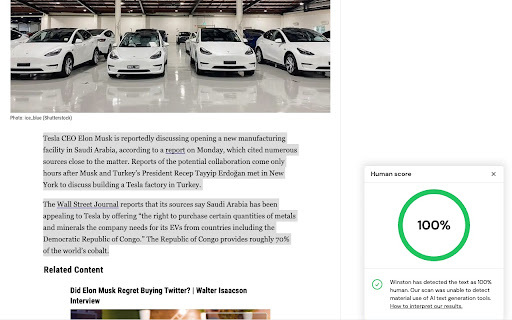
Winston AI - Chrome Extension Website screenshot

What is Winston AI - Chrome Extension?

Winston AI - Chrome Extension is a powerful, reliable tool designed to detect content created by artificial intelligence, including ChatGPT and other popular AI writing platforms. With its advanced detection algorithms, it helps users maintain integrity and trust in digital content across educational, professional, and publishing environments.

How to use Winston AI - Chrome Extension?

Using the Winston AI Chrome Extension is simple: install it from the Chrome Web Store, sign up for a free account, and begin analyzing text on any webpage. Just highlight the desired content (minimum 500 characters), right-click, and select "Scan with Winston AI." Each word analyzed consumes one credit from your balance.

🟢

Winston AI - Chrome Extension - Key Features

Key Features From Winston AI - Chrome Extension

Unmatched accuracy in identifying AI-generated text

Comprehensive detection across all major AI writing models

Real-time scanning directly within your browser

Multilingual support including English, Spanish, French, and German — with additional languages in development

🟢

Winston AI - Chrome Extension - Frequently Asked Questions

FAQ from Winston AI - Chrome Extension

What is Winston AI - Chrome Extension?

Winston AI - Chrome Extension is a leading AI content detector that enables users to verify whether text has been generated by AI tools like ChatGPT. It delivers high precision results and is trusted by educators, editors, and organizations globally.

How do I scan content using the extension?

After installing the extension and logging into your account, simply highlight at least 500 characters of text on a webpage, right-click, and choose “Scan with Winston AI” to check for AI-generated content.

How many credits do I need to perform a scan?

Each word scanned uses one credit. For example, scanning 1,000 words will consume 1,000 credits. Free accounts come with an initial credit balance, and additional credits can be purchased as needed.