Web Assistant by ChatGPT - Chrome Extension

Product Name: ai tool for web writing AI

Web Assistant by ChatGPT - Chrome Extension: Product Name, an ai tool for seamless web writing, anywhere you work daily.

🟒

Web Assistant by ChatGPT - Chrome Extension - Introduction

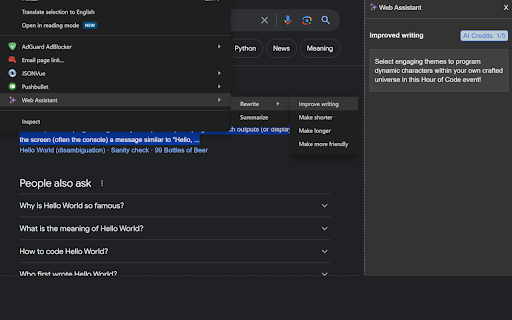
Web Assistant by ChatGPT - Chrome Extension Website screenshot

What is Web Assistant by ChatGPT ai chrome extension?

Web Assistant by ChatGPT is an AI tool for web writing that brings ChatGPT-powered support directly into the websites and workspaces you use every day. It helps you understand information, summarize text, and create clearer content without switching between tabs.

How to use Web Assistant by ChatGPT ai chrome extension?

Install the Chrome extension, open a supported webpage, and highlight the text you want to work with. Right-click to launch the assistant, then use its AI tools to rewrite, summarize, expand, or respond to content in context.

🟒

Web Assistant by ChatGPT - Chrome Extension - Key Features

Key Features From Web Assistant by ChatGPT ai chrome extension

Works inside email, Notion, Slack, Asana, Jira, Intercom, Google Docs, and other popular web apps

Creates quick summaries of articles, messages, pages, and lengthy email conversations

Provides context-aware writing help for drafting, editing, and improving text

Identifies actionable tasks and important details from workplace discussions

Web Assistant by ChatGPT ai chrome extension's Use Cases

Turning long web pages or online discussions into concise notes

Writing professional emails, replies, updates, and workplace messages

Finding assignments and next steps hidden in conversations

🟒

Web Assistant by ChatGPT - Chrome Extension - Frequently Asked Questions

FAQ from Web Assistant by ChatGPT - Chrome Extension

What is Web Assistant by ChatGPT?

It is an AI tool for web writing and productivity that adds ChatGPT assistance to the online tools where you work, helping with summaries, text creation, and everyday communication.

How to use Web Assistant by ChatGPT?

Select text on a webpage or inside a compatible web application, right-click it, and choose the available AI action. The extension can then help rewrite, summarize, or generate content.

How to activate the Web Assistant?

Highlight the relevant text and open the right-click menu. Select the Web Assistant option to access its writing, summarization, and task-extraction features.