Walles.AI - Chrome Extension

Walles.AI - Chrome Extension: AI Tool

Walles.AI - Chrome Extension: A powerful AI tool—your GPT-4 AI assistant plugin for seamless browsing, research & productivity.

🟢

Walles.AI - Chrome Extension - Introduction

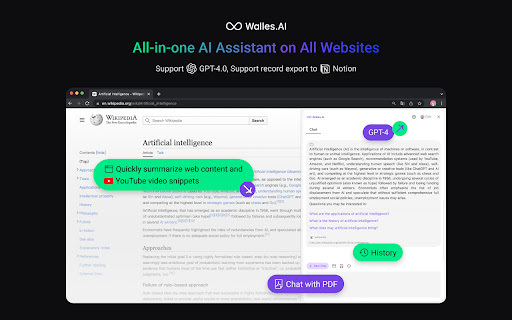
Walles.AI - Chrome Extension Website screenshot

What is Walles.AI ai chrome extension?

Walles.AI is a next-generation AI browser companion—your always-on GPT-4 powered assistant built natively for Chrome. Designed to elevate how you read, learn, and create online, it delivers intelligent summarization, real-time multilingual translation, deep contextual understanding, and seamless knowledge capture—all without switching tabs or copying text.

How to use Walles.AI ai chrome extension?

1. Click the Walles.AI icon to launch the interactive sidebar—your AI workspace inside any webpage
2. Highlight any text to instantly generate explanations, translate into 30+ languages, or rewrite with clarity and tone control
3. Watch YouTube videos? Activate one-click AI summaries—get key insights in seconds
4. Drag & drop PDFs, research papers, or reports directly into the sidebar for lightning-fast, accurate article distillation

🟢

Walles.AI - Chrome Extension - Key Features

Key Features From Walles.AI ai chrome extension

GPT-4 Intelligence, Built-In

Context-Aware Translation

Advanced Reasoning for Complex Queries

Long-Document Understanding (up to 128K tokens)

Walles.AI ai chrome extension's Use Cases

Ask nuanced questions—and get thoughtful, cited answers while browsing

Break down dense content: academic texts, legal clauses, technical docs

Turn video lectures, tutorials, and interviews into structured notes

Convert lengthy PDFs into concise, actionable summaries—with bullet points & key takeaways

🟢

Walles.AI - Chrome Extension - Frequently Asked Questions

FAQ from Walles.AI - Chrome Extension

What is Walles.AI?

A free, high-fidelity AI extension that brings enterprise-grade GPT-4 capabilities directly into your browser—designed for researchers, students, professionals, and lifelong learners who demand accuracy, speed, and contextual depth.

How to use Walles.AI?

1. Install → click the icon → open the smart sidebar
2. Highlight, right-click, or use keyboard shortcuts to activate AI actions
3. Summarize YouTube videos with a single click
4. Upload documents (PDF, TXT, DOCX) for instant comprehension and export-ready output

Where can Walles.AI be used?

Everywhere—across 99% of websites: news portals, academic journals, coding forums, e-commerce sites, social platforms, and even password-protected internal tools (with user permission). Works offline for uploaded files, and syncs summaries to Notion, Obsidian, and clipboard.