VideoGen - Chrome Extension

VideoGen - Chrome Extension: AI Tool for Effortless Video Creation

VideoGen - Chrome Extension: An AI tool for effortless video creation with AI narration—install now and transform ideas into videos instantly!

🟢

VideoGen - Chrome Extension - Introduction

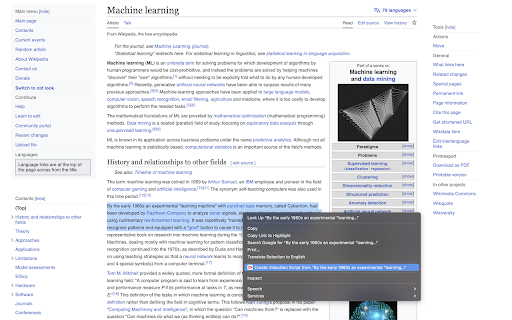
VideoGen - Chrome Extension Website screenshot

What is VideoGen ai chrome extension?

VideoGen is a lightweight, intelligent Chrome extension that turns any written content—blogs, scripts, notes, or web text—into polished, shareable videos in seconds. Powered by generative AI, it auto-generates natural-sounding voiceovers, on-screen captions, contextual B-roll clips, and adaptive background music—all within your browser.

How to use VideoGen ai chrome extension?

Simply install the extension, highlight any text on a webpage (or paste your own), click the VideoGen icon, and watch as your content transforms into a professional-grade video—no editing skills, downloads, or rendering time required.

🟢

VideoGen - Chrome Extension - Key Features

Key Features From VideoGen ai chrome extension

AI narration with emotion-aware voice synthesis

Smart captioning with timing-synchronized text

Context-aware B-roll suggestions powered by visual AI

VideoGen ai chrome extension's Use Cases

Turn long-form articles into engaging short-form videos

Produce classroom-ready explainers and training clips

🟢

VideoGen - Chrome Extension - Frequently Asked Questions

FAQ from VideoGen - Chrome Extension

What is VideoGen?

An AI-powered Chrome extension designed to democratize video creation—transforming plain text into dynamic, narrated videos with zero manual production.

How to use VideoGen?

Select text anywhere online → click the VideoGen toolbar button → customize tone/music (optional) → generate and download instantly.

Is VideoGen free to use?

Yes—get started for free with full access to core features. Advanced templates, higher-resolution exports, and extended AI voices are available via affordable subscription plans.