Text Explorer - Chrome Extension

Text Explorer - Chrome Extension: AI Tool for Smart Text Insights

Text Explorer - Chrome Extension: AI tool highlighting information—smart, fast, and built for researchers. Your ultimate AI tool for text insights.

🟢

Text Explorer - Chrome Extension - Introduction

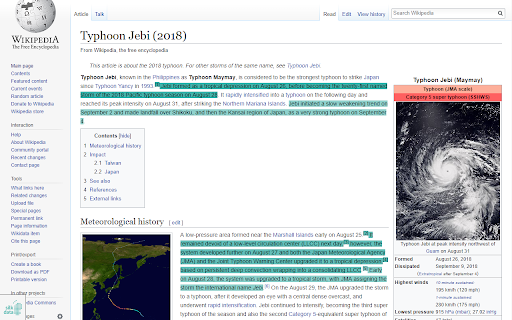
Text Explorer - Chrome Extension Website screenshot

What is Text Explorer ai chrome extension?

Text Explorer is a next-generation AI assistant embedded directly into your browser—designed to transform how researchers, analysts, and knowledge workers interact with text. By intelligently scanning web content in real time, it surfaces critical insights—identifying core concepts, relationships, and contextual significance—so you absorb more, faster, and with greater precision.

How to use Text Explorer ai chrome extension?

Activate Text Explorer with a single click on any supported webpage. Instantly, AI-driven highlights appear—emphasizing pivotal terms, claims, entities, and logical structures. Adjust analysis depth, toggle language-aware processing, or switch between “Research Mode” and “Summary Mode” via the intuitive bottom toolbar. For granular control—including custom entity filters, highlight intensity, and export options—launch the full dashboard from the extension popup.

🟢

Text Explorer - Chrome Extension - Key Features

Key Features From Text Explorer ai chrome extension

Context-Aware Keyword & Sentence Highlighting

Multi-Lingual Named Entity Recognition (NER) — English, German, Russian

Adaptive Reading Intelligence: Prioritizes relevance, not just frequency

Text Explorer ai chrome extension's Use Cases

Accelerate literature review and source evaluation

Extract actionable insights from dense reports, papers, or documentation

🟢

Text Explorer - Chrome Extension - Frequently Asked Questions

FAQ from Text Explorer - Chrome Extension

What is Text Explorer?

Text Explorer is an AI-native Chrome extension built for deep, intelligent text engagement—turning passive reading into active insight discovery through real-time semantic analysis and visual prioritization.

How to use Text Explorer?

Click the extension icon while browsing to activate. Highlights appear instantly—refined by AI confidence scoring and domain-aware models. Use the floating control bar to refine output focus, adjust sensitivity, or pause analysis. Access advanced configuration—including custom term lists and citation-aware highlighting—via the expandable settings panel.

What pages does the extension not work with?

Due to technical restrictions and dynamic rendering limitations, Text Explorer currently excludes Telegra.ph, certain social media platforms (e.g., X/Twitter, Instagram), and password-protected or iframe-heavy sites. Support for additional domains is actively expanding.