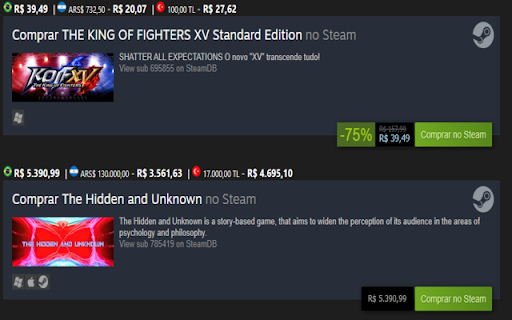
What is Steam Link Price Checker ai chrome extension?
Steam Link Price Checker is an intelligent Chrome extension designed for community-driven forums—leveraging AI to detect Steam store URLs in real time and instantly enrich forum posts with up-to-date, region-aware pricing data. As you compose messages, it analyzes each Steam link, retrieves localized prices (including discounts and currency conversions), and seamlessly appends them—no manual lookups required.
How to use Steam Link Price Checker ai chrome extension?
After installing the extension from the Chrome Web Store, simply navigate to a supported forum and begin drafting a reply or post containing a valid Steam game URL. Within seconds, the extension activates—fetching and embedding official regional pricing directly into your message draft before submission.
Steam Link Price Checker ai chrome extension's Core Features
AI-powered real-time Steam price detection & enrichment
Non-intrusive, context-aware integration with forum text editors
Steam Link Price Checker ai chrome extension's Use Cases
Adding verified, multi-region pricing to Steam-related forum discussions
Empowering users to spot regional deals and currency advantages at a glance
FAQ from Steam Link Price Checker - Chrome Extension
What is Steam Link Price Checker?
An AI-enhanced Chrome extension that intelligently identifies Steam game links while you type in compatible forums—and automatically augments your message with accurate, localized pricing data sourced directly from Steam's public API.
How to use Steam Link Price Checker?
Install the extension, visit a supported forum (e.g., forum.adrenaline.com.br or forum.outerspace.com.br), and include a Steam game URL in your message draft. The extension handles the rest—fetching and inserting prices invisibly and instantly.
Which forums are supported by the extension?
The extension currently supports forum.adrenaline.com.br and forum.outerspace.com.br—with more communities planned for future updates based on user demand and platform compatibility.