SpeechGen.io

SpeechGen.io: ai tool for voiceover uses

SpeechGen.io: Realistic ai tool for natural American voiceovers in MP3/WAV for videos ads, learning, and presentations.

🟒

SpeechGen.io - Introduction

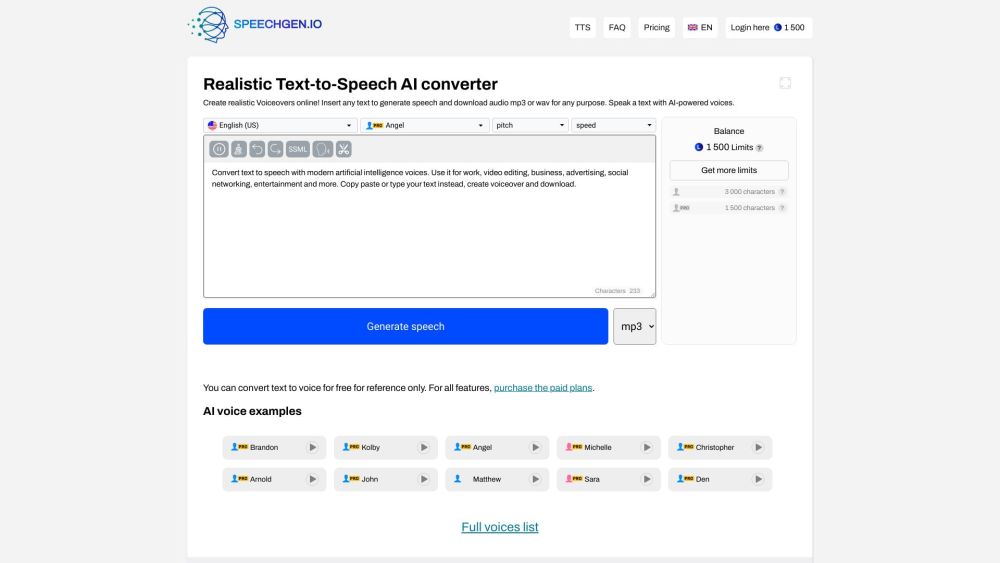
SpeechGen.io Website screenshot

What is SpeechGen.io?

SpeechGen.io is an AI-powered voiceover and text-to-speech platform that turns written content into natural-sounding speech. Users can enter a script, article, lesson, advertisement, or presentation and convert it into an audio file with realistic male or female voices. The finished voiceover can be exported in MP3 or WAV format, making it suitable for video production, online courses, marketing campaigns, podcasts, presentations, and other digital content.

The service includes voices designed for natural American English pronunciation, along with controls that help users adjust the delivery of the generated audio. SpeechGen.io can be useful for creators who need a quick narration, businesses preparing promotional material, educators producing accessible lessons, and anyone who wants to add an audio version to written content.

How to use SpeechGen.io?

To create a voiceover, open SpeechGen.io and enter or paste the text into the editor. Choose a suitable voice, then select the language or accent when available. After pressing the generate button, the platform processes the script and produces an audio preview. If the result meets your needs, you can download the recording as an MP3 or WAV file.

Before generating the final version, you can refine the narration by changing options such as speaking rate, pitch, emphasis, pronunciation, intonation, and pauses. The editor also supports SSML, which allows more detailed control over how particular words and sections are spoken. Multi-voice editing can help users create conversations, interviews, dialogue scenes, or presentations with different speakers.

🟒

SpeechGen.io - Key Features

Key Features From SpeechGen.io

AI-generated natural voiceovers

Convert written scripts into clear speech with voices intended to sound smooth and realistic.

American English voice options

Select from AI voices that support natural American English delivery for narration, advertising, lessons, and business content.

MP3 and WAV downloads

Save completed voiceovers in MP3 or WAV format for use in videos, presentations, audio projects, and other media.

Detailed voice controls

Adjust speed, pitch, stress, pronunciation, emphasis, intonation, and pauses to match the style of your script.

SSML compatibility

Use Speech Synthesis Markup Language to add advanced instructions and control how selected words or sentences are delivered.

Dialogue and multi-voice editing

Build conversations or multi-speaker scenes by combining different voices in one project.

Commercial-use support

Generated audio can be used in eligible commercial projects, including promotional videos, advertisements, online content, and branded materials.

Favorites and saved projects

Keep frequently used or preferred voiceover files available through the favorites area of your account.

Accessible pricing options

SpeechGen.io provides testing access and paid plans for users who need larger character limits or broader production use.

SpeechGen.io Use Cases

Video narration

Create spoken audio for YouTube videos, TikTok clips, Instagram content, tutorials, and other social media projects.

Advertising and promotional content

Produce voiceovers for video advertisements, product demonstrations, promotional creatives, and campaign material.

Online education

Add narration to instructional videos, language lessons, training modules, presentations, and e-learning courses.

Business presentations

Turn slides, reports, and PowerPoint content into narrated presentations that are easier to follow.

Podcast and audio production

Prepare spoken versions of scripts, announcements, informational segments, or other audio content for publishing platforms.

Mobile and desktop applications

Use generated speech for app demonstrations, software guides, onboarding content, and product interfaces.

Article and document reading

Convert written articles, documents, essays, and web content into audio for listening and accessibility purposes.

Audiobooks and stories

Generate narration for short stories, ebooks, fairy tales, and other creative reading projects.

Public announcements

Create welcome messages, information notices, and announcements for websites, airports, stations, parks, offices, and events.

Voicemail greetings

Make customized greeting messages for personal phone lines, business numbers, and customer service systems.

Creative and meme content

Add distinctive spoken lines to memes, short-form videos, creative experiments, and entertainment projects.

Audio versions of existing content

Extend the reach of written material by offering an audio alternative for people who prefer listening.

🟒

SpeechGen.io - Frequently Asked Questions

FAQ from SpeechGen.io

What is SpeechGen.io?

SpeechGen.io is an online AI voice generator that changes written text into realistic speech. It can create voiceovers in MP3 or WAV format for videos, advertisements, educational content, presentations, podcasts, and other projects.

How can I create a voiceover with SpeechGen.io?

Paste or type your script into the editor, select a voice, adjust the available settings, and click the generate button. After the audio has been processed, you can listen to the result and download the file in your preferred format.

Can I use SpeechGen.io audio in YouTube videos and advertisements?

Yes. Generated audio can be used for projects such as YouTube videos, TikTok content, Instagram posts, promotional videos, video advertisements, and other media, subject to the applicable SpeechGen.io plan and usage terms.

How can I add a pause to the narration?

You can insert a pause through the editor controls or add an SSML break instruction. For example, <break time="1500ms"> can be used to request a pause of approximately 1.5 seconds.

Can I create a conversation with more than one voice?

Yes. The multi-voice editor allows users to assign different voices to separate parts of a script, which is useful for dialogues, interviews, role-play lessons, and conversational videos.

Can I save voiceover files for later?

You can save preferred files in your favorites area when using an account. This makes it easier to return to previously created audio or voices you use regularly.

What audio formats are available?

SpeechGen.io supports downloadable MP3 and WAV audio files. You can select the format that best fits your video editor, presentation software, podcast workflow, or other production needs.

Does SpeechGen.io support advanced pronunciation control?

Yes. In addition to voice settings such as speed, pitch, stress, and emphasis, the platform supports SSML for more precise instructions involving pronunciation, intonation, and pauses.

Are SpeechGen.io voices available for commercial projects?

SpeechGen.io supports commercial use for suitable plans and projects. This may include business presentations, advertisements, branded videos, social media campaigns, and other monetized content. Review the current terms and pricing information before publishing commercial work.

Can I try SpeechGen.io without paying?

SpeechGen.io offers a limited trial that allows users to test the text-to-speech service with up to 1,000 characters. Registration may provide an additional 1,000 characters for testing. Users who need longer scripts or more production features can review the available paid plans.