SayAI - Chrome Extension

SayAI - Chrome Extension: AI Tool for ChatGPT Speech Functions

SayAI - Chrome Extension: An AI tool that enhances ChatGPT with seamless speech-to-text and text-to-speech functions—SayAI in action.

🟢

SayAI - Chrome Extension - Introduction

SayAI - Chrome Extension Website screenshot

What is SayAI ai chrome extension?

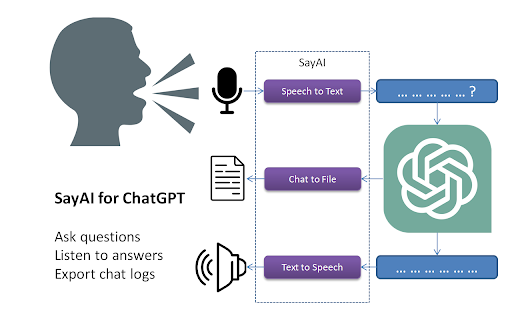
SayAI is a lightweight, intelligent Chrome extension that transforms how you interact with ChatGPT—turning spoken words into typed prompts and converting AI-generated responses into natural-sounding speech, all within your browser.

How to use SayAI ai chrome extension?

After installing the extension, click its icon in the Chrome toolbar to activate voice input or output. Press the microphone button to speak your query—and let SayAI transcribe it instantly. Toggle the speaker icon to hear ChatGPT's reply aloud, using your system’s built-in voices.

🟢

SayAI - Chrome Extension - Key Features

Key Features From SayAI ai chrome extension

Real-time multilingual speech recognition

Natural text-to-speech powered by native OS voices

One-click enable/disable for both audio modes

Hands-free prompting via voice commands

SayAI ai chrome extension's Use Cases

Voice-first interaction: Ask complex questions without lifting a finger

Audio-first consumption: Get AI insights through listening—ideal for multitasking, accessibility, or on-the-go learning

🟢

SayAI - Chrome Extension - Frequently Asked Questions

FAQ from SayAI - Chrome Extension

What is SayAI?

SayAI is an AI-powered Chrome extension designed to add intuitive, real-time speech capabilities to ChatGPT—bridging the gap between voice and text in everyday AI conversations.

How to use SayAI?

Install the extension, open ChatGPT in Chrome, and use the SayAI toolbar controls to record voice inputs or play back responses—no setup or accounts required.

Is SayAI free to use?

Yes—SayAI is 100% free, open to all users, with no subscriptions, paywalls, or usage limits.