Restore Photo

Restore Photo: AI Tool to Restore Old Photos

Restore Photo: An AI tool that reverses time—restoring old, damaged, or faded photos with precision. Restore Photo delivers stunning, lifelike results.

🟢

Restore Photo - Introduction

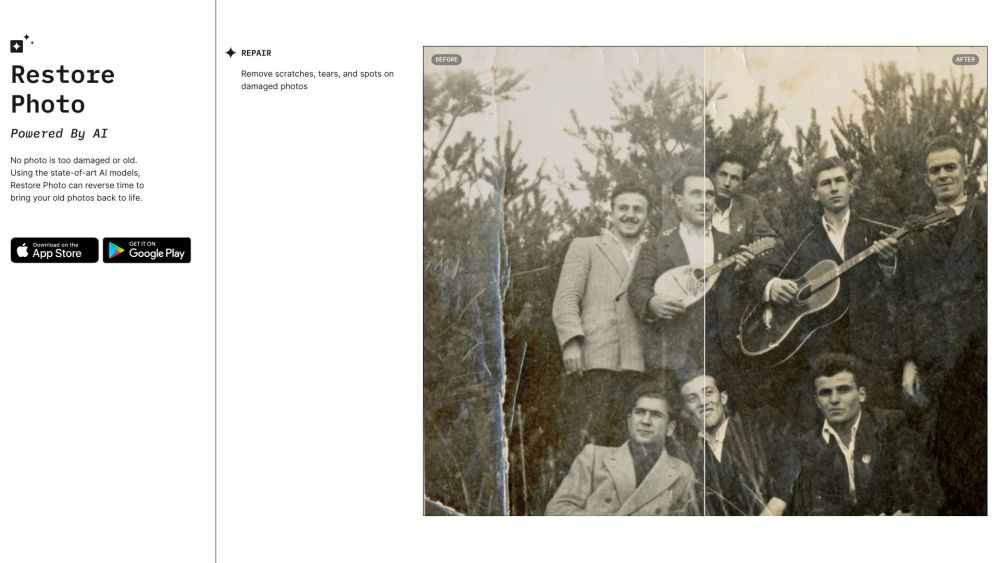
Restore Photo Website screenshot

What is Restore Photo?

Restore Photo is a cutting-edge AI photo restoration platform engineered to breathe new life into cherished memories. Leveraging advanced deep learning models, it intelligently reconstructs degraded visual details—reversing decades of wear, tear, and time with remarkable fidelity. Whether it's a sepia-toned heirloom, a water-damaged snapshot, or a grainy digitized print, Restore Photo transforms the past into vivid, high-fidelity imagery—faithful to the original spirit, yet revitalized for today.

How to use Restore Photo?

Using Restore Photo is intuitive and seamless: upload your photo via web browser or mobile interface, select your preferred enhancement mode (e.g., damage repair, colorization, or upscaling), and let the AI work its magic. In seconds, the system analyzes pixel-level imperfections—identifying cracks, dust marks, discoloration, and blurring—and applies context-aware restoration. You can preview real-time adjustments, fine-tune output quality, and download your professionally restored image in high-resolution PNG or JPEG format—ready to print, share, or archive.

🟢

Restore Photo - Key Features

Key Features From Restore Photo

Intelligent damage removal: erase scratches, creases, stains, and physical artifacts without compromising authenticity

Smart color reconstruction: restore natural skin tones, period-accurate hues, and luminous contrast—even from monochrome originals

AI-powered resolution enhancement: upscale low-res images up to 4x while preserving facial structure, texture, and fine detail

Restore Photo's Use Cases

Revive irreplaceable family portraits and generational milestones—preserving emotional resonance across time

Digitally conserve archival photographs for museums, libraries, and historical societies

Modernize legacy digital captures—from early smartphones or low-end scanners—into gallery-ready visuals

🟢

Restore Photo - Frequently Asked Questions

FAQ from Restore Photo

What is Restore Photo?

Restore Photo is a next-generation AI service designed to digitally heal, enrich, and elevate aging photographs—combining precision restoration with artistic sensitivity to honor each image’s unique history.

How to use Restore Photo?

Start by uploading your photo through the secure web portal. The AI instantly assesses degradation type and severity, then applies targeted restoration layers—repairing structural flaws, reintroducing lost color, and refining resolution—all in one unified workflow. Your restored image is ready for download within minutes.

What types of damages can Restore Photo fix?

It handles a wide spectrum: surface-level blemishes (scratches, mold spots, ink bleed), chemical deterioration (fading, yellowing, silvering), mechanical damage (tears, folds, missing corners), and digital limitations (pixelation, noise, motion blur). Its neural architecture understands photographic context—so repairs look organic, not artificial.

How long does it take to restore a photo?

Most restorations complete in under 90 seconds. Complex cases—such as heavily fragmented scans or ultra-low-resolution inputs—may require up to 3–4 minutes, depending on server load and selected enhancement depth.

Can I use Restore Photo for commercial purposes?

Absolutely. All restored outputs are yours to use freely—including for publishing, marketing, or product design—provided you hold appropriate rights to the source image. Commercial plans offer priority processing and batch capabilities.

Is my uploaded photo secure and private?

Yes. Every upload is encrypted in transit and at rest. Photos are automatically deleted from servers within 24 hours unless explicitly saved to your account. Restore Photo never stores, shares, sells, or trains on user-submitted content—your memories remain confidential by design.

How can I contact the team behind Restore Photo?

Our support and development team welcomes your questions, suggestions, or collaboration ideas at [email protected]. We typically respond within one business day—and often much sooner.