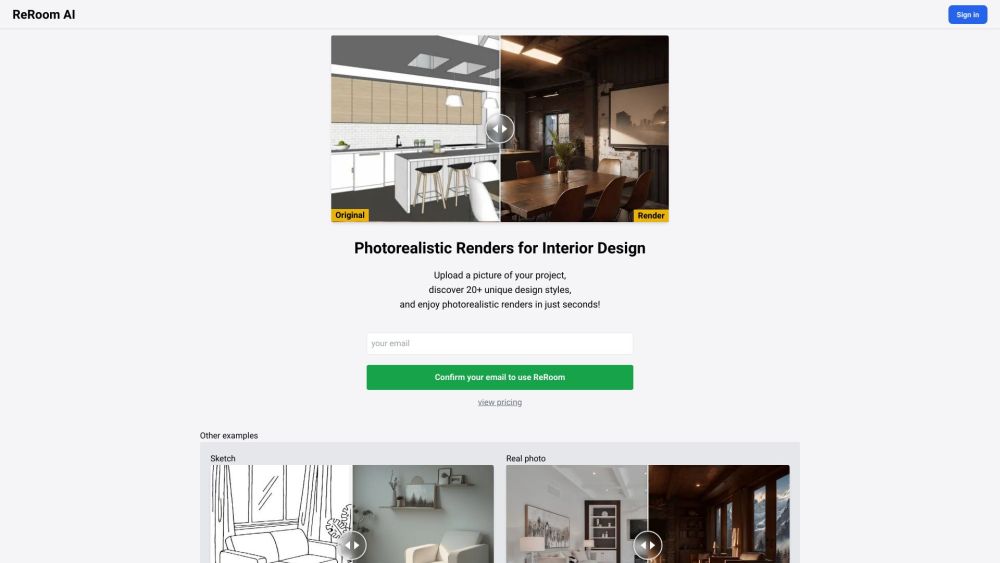
ReRoom AI - Photorealistic Renders for Interior Design

ReRoom AI: AI Tool for Photorealistic Renders

ReRoom AI - Photorealistic Renders for Interior Design: A lightning-fast AI tool that transforms SketchUp visuals into photorealistic renders in seconds—20+ styles, instant results.

🟢

ReRoom AI - Photorealistic Renders for Interior Design - Introduction

ReRoom AI - Photorealistic Renders for Interior Design Website screenshot

What is ReRoom AI - Photorealistic Renders for Interior Design?

ReRoom AI is a next-generation AI-powered platform engineered specifically for interior designers, architects, and renovation professionals who need stunning, presentation-ready visuals—fast. Unlike traditional rendering tools that require hours of setup and computation, ReRoom AI instantly transforms flat SketchUp exports or simple room photos into rich, photorealistic interior scenes. With intelligent lighting simulation, material-aware texture mapping, and context-aware spatial enhancement, it delivers studio-quality renders in under 10 seconds—no GPU rendering farm required.

How to use ReRoom AI - Photorealistic Renders for Interior Design?

1. Create an account or log in via Google or email—no credit card needed to start.
2. Upload your SketchUp export (JPEG/PNG) or a well-lit photo of your interior space.
3. Choose from 20+ curated design aesthetics—from Scandinavian minimalism and Japandi warmth to industrial loft and coastal luxe.
4. Adjust lighting intensity, camera angle presets, and ambient tone with intuitive sliders.
5. Hit “Render” and download high-resolution, watermark-free images optimized for client decks, social media, or print.

🟢

ReRoom AI - Photorealistic Renders for Interior Design - Key Features

Key Features From ReRoom AI - Photorealistic Renders for Interior Design

One-click photorealistic rendering from SketchUp exports or real-world photos

20+ professionally crafted interior design styles—each trained on real-world material libraries and lighting conditions

Sub-10-second AI inference powered by proprietary diffusion architecture tuned for architectural fidelity

Commercial-grade output: 4K resolution, sRGB + Adobe RGB support, and batch-download capability

ReRoom AI - Photorealistic Renders for Interior Design's Use Cases

Accelerating design iteration cycles during early-stage concept development

Creating compelling visual proposals for residential and commercial clients

Generating mood board assets and social-ready content for marketing teams

Validating material, color, and layout decisions before construction begins

  • ReRoom AI - Photorealistic Renders for Interior Design Support Email & Customer service contact & Refund contact etc.

    For prompt assistance, reach out to ReRoom AI's dedicated support team at [email protected]. For full details—including refund policy, response SLAs, and live chat availability—visit the official contact page.

  • ReRoom AI - Photorealistic Renders for Interior Design Company

    ReRoom AI is developed and maintained by Stylefie, Inc., a San Francisco–based AI studio focused on applied generative tools for the built environment.

    Learn more about our mission, team, and technology stack at our About page.

  • ReRoom AI - Photorealistic Renders for Interior Design Login

    Get started in seconds: https://reroom.ai/sign-in

  • ReRoom AI - Photorealistic Renders for Interior Design Pricing

    Flexible plans for freelancers, studios, and enterprises—including free tier access and volume-based credits. View all options at Pricing Hub.

🟢

ReRoom AI - Photorealistic Renders for Interior Design - Frequently Asked Questions

FAQ from ReRoom AI - Photorealistic Renders for Interior Design

What is ReRoom AI?

ReRoom AI is a specialized AI rendering engine that converts basic interior visuals—like SketchUp screenshots or smartphone photos—into photorealistic, stylistically coherent scenes. Built for speed *and* realism, it bridges the gap between ideation and visualization without sacrificing professional quality.

How does ReRoom AI differ from other AI renderers?

While many tools generate generic “AI art,” ReRoom AI is trained exclusively on architectural interiors—understanding spatial hierarchy, material reflectivity, occlusion shadows, and human-scale proportion. Its outputs maintain structural accuracy while elevating aesthetics—making it trusted by over 12,000 design professionals.

Do I need SketchUp to use ReRoom AI?

No. While SketchUp exports are optimized for best results, ReRoom AI also accepts clean, front-facing photos of rooms (e.g., from staging shoots or site visits). Our AI automatically detects walls, floors, ceilings, and key furniture to anchor the render contextually.

Can I customize lighting or materials per render?

Yes—beyond style selection, you can fine-tune global lighting (warm/cool, bright/soft), adjust wall/floor finish realism, and toggle ambient occlusion—all in real time before finalizing your render.

Is my project data secure?

Absolutely. All uploads are encrypted in transit and at rest. Rendered images are deleted from servers after 72 hours unless saved to your private dashboard. Stylefie, Inc. complies with GDPR and CCPA—and never trains its models on user-submitted projects.

What file formats can I download?

High-res PNG (transparent background option), JPEG (optimized for web), and PDF (print-ready, single-page presentation format)—all available immediately post-render.

Is there an API or enterprise integration?

Yes. ReRoom AI offers RESTful API access, Figma plugin integration, and custom SSO + white-label deployment for architecture firms and design platforms. Contact [email protected] for details.