Replyio.com - Chrome Extension

Replyio.com - Chrome Extension: AI Tool for Intelligent Replies

Replyio.com - Chrome Extension: AI tool for automated, intelligent replies—boost productivity instantly. Product Name delivers seamless response automation.

🟢

Replyio.com - Chrome Extension - Introduction

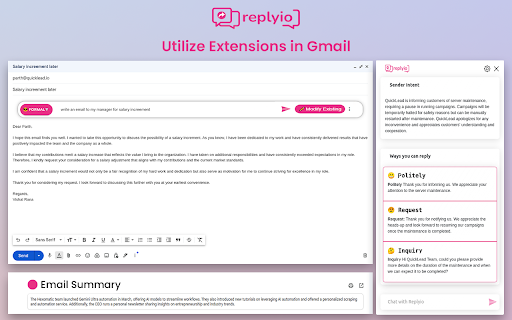
Replyio.com - Chrome Extension Website screenshot

What is Replyio.com ai chrome extension?

Replyio.com is a lightweight, intelligent Chrome extension that transforms how you engage online—using AI to generate accurate, tone-appropriate, and contextually relevant replies across email, social platforms, and messaging apps—instantly and without manual drafting.

How to use Replyio.com ai chrome extension?

Install the extension from the Chrome Web Store, sign in with your existing ChatGPT account (no separate registration required), and activate it on supported websites—replies generate in real time as you browse, with one-click send or edit flexibility.

🟢

Replyio.com - Chrome Extension - Key Features

Key Features From Replyio.com ai chrome extension

Smart Message Triage

LinkedIn Outreach Automation with Human-Like Personalization

Native Multilingual Response Generation

End-to-End Encryption & Zero-Knowledge Processing

Strictly In-Memory Operation — No Data Leaves Your Browser

Unlimited Usage — No Tokens, Quotas, or Paywalls

Replyio.com ai chrome extension's Use Cases

Automatically flag urgent messages and surface high-priority conversations

Scale authentic LinkedIn engagement with dynamic personalization (job titles, company names, mutual connections)

Break language barriers with real-time, culturally aware replies in 50+ languages

🟢

Replyio.com - Chrome Extension - Frequently Asked Questions

FAQ from Replyio.com - Chrome Extension

What is Replyio.com?

An AI-powered Chrome extension designed for professionals who need fast, thoughtful, and context-aware responses—without compromising voice, accuracy, or privacy.

How to use Replyio.com?

After installing the extension, authenticate via your ChatGPT account. Then, simply open any supported inbox or platform—the AI activates automatically, suggesting intelligent replies inline.

What are the requirements to start using Replyio.com?

All you need is an active ChatGPT account and Google Chrome. No additional setup, subscriptions, or configuration—just install, log in, and reply smarter.