Professional Email Rephraser - Chrome Extension

Professional Email Rephraser: AI Tool for Instant Professionalism

Professional Email Rephraser - Chrome Extension: ai tool that enhances email professionalism instantly with smart rephrasing.

🟢

Professional Email Rephraser - Chrome Extension - Introduction

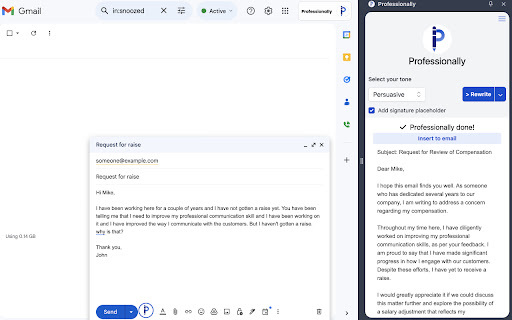
Professional Email Rephraser - Chrome Extension Website screenshot

What is Professional Email Rephraser ai chrome extension?

The Professional Email Rephraser is a powerful AI-driven Chrome extension designed to instantly refine your email language, transforming casual or unclear messages into polished, professional correspondence directly within Gmail.

How to use Professional Email Rephraser ai chrome extension?

Get started in seconds—install the extension from the Chrome Web Store, log into your Gmail account, and activate the tool with a single click. Once enabled, it works automatically as you compose or reply to emails.

🟢

Professional Email Rephraser - Chrome Extension - Key Features

Key Features From Professional Email Rephraser ai chrome extension

AI-Powered Tone Enhancement

Intelligently adjusts word choice and sentence structure to convey confidence and clarity while maintaining your intended message.

Real-Time Rephrasing in Gmail

Instantly rephrases your draft emails on the fly, ensuring every message meets professional standards without leaving your inbox.

Professional Email Rephraser ai chrome extension's Use Cases

Streamlining workplace communication

Ideal for professionals who want to make b impressions in client emails, internal updates, or cross-team collaboration.

Building better email habits

Helps users develop a more respectful and articulate tone over time, improving overall email etiquette and responsiveness.

🟢

Professional Email Rephraser - Chrome Extension - Frequently Asked Questions

FAQ from Professional Email Rephraser - Chrome Extension

What is Professional Email Rephraser?

It's an AI-powered browser extension that enhances the professionalism of your emails by automatically refining tone and wording in Gmail.

How to use Professional Email Rephraser?

After installing the extension, simply open Gmail and toggle the rephraser on—no additional steps required. It integrates seamlessly into your workflow.

Can I customize the rephrased emails?

Yes, the tool offers adjustable settings that let you control the formality level, tone preference, and style to match your personal or company voice.