Print Perfect - Chrome Extension

Print Perfect - Chrome Extension: AI Tool

Print Perfect - Chrome Extension: An AI tool that enhances text with semantic correction—install Print Perfect for smarter, error-free writing.

🟢

Print Perfect - Chrome Extension - Introduction

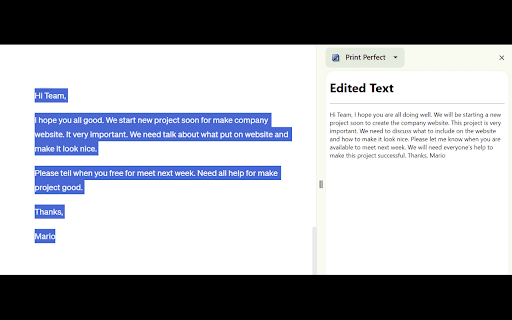
Print Perfect - Chrome Extension Website screenshot

What is Print Perfect ai chrome extension?

Print Perfect is an intelligent AI-powered Chrome extension designed to refine written content in real time—going beyond grammar checks to understand meaning, tone, and intent for truly polished output.

How to use Print Perfect ai chrome extension?

Select any text on a webpage, right-click to open the context menu, choose “Enhance with Print Perfect”, and instantly preview AI-optimized suggestions in a clean, non-intrusive sidebar.

🟢

Print Perfect - Chrome Extension - Key Features

Key Features From Print Perfect ai chrome extension

Context-aware semantic refinement

Leverages advanced language models to reinterpret sentences holistically—correcting awkward phrasing, improving clarity, and preserving voice—without losing original intent.

Print Perfect ai chrome extension's Use Cases

Polishing professional emails

Optimizing blog posts and landing pages

Elevating product descriptions and marketplace listings

🟢

Print Perfect - Chrome Extension - Frequently Asked Questions

FAQ from Print Perfect - Chrome Extension

What is Print Perfect?

An AI writing assistant built natively into Chrome that intelligently rewrites and refines text using deep semantic analysis—not just syntax rules.

How to use Print Perfect?

Highlight text anywhere online → right-click → select “Enhance with Print Perfect” → review refined suggestions in the interactive side panel.

How does Print Perfect work?

By interpreting sentence-level meaning through state-of-the-art AI, Print Perfect delivers natural-sounding improvements—ensuring correctness, coherence, and contextual appropriateness in every edit.