Nexto - Chrome Extension

Nexto - Chrome Extension: AI Tool for Product Name

Nexto - Chrome Extension: An AI tool that transforms sales communications into tasks efficiently—Product Name boosts productivity instantly.

🟢

Nexto - Chrome Extension - Introduction

Nexto - Chrome Extension Website screenshot

What is Nexto - Chrome Extension?

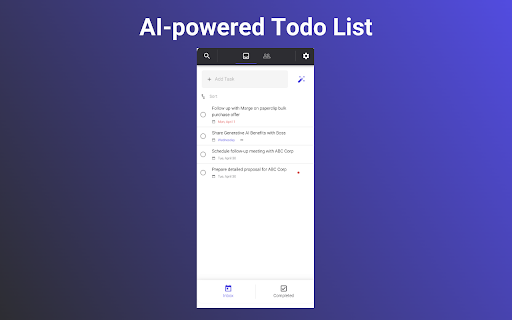
Nexto is an intelligent, AI-powered Chrome extension built specifically for sales professionals—turning scattered email conversations and call notes into clear, prioritized tasks in seconds. More than just a to-do list, it functions as a lightweight CRM that learns from your communication patterns to surface what matters most.

How to use Nexto - Chrome Extension?

1. Add Nexto to Chrome with one click via the official Chrome Web Store. 2. Launch it directly from your Gmail or Outlook toolbar (supported on both). 3. Click the “Pin” icon to keep Nexto always accessible. 4. Highlight any sales-related email or paste a call summary, then tap the AI-powered “Create Task” button to instantly generate smart follow-ups.

🟢

Nexto - Chrome Extension - Key Features

Key Features From Nexto - Chrome Extension

Smart Task Generation Powered by AI

Contact & Deal Context Awareness

One-Click Task Creation + Custom Fields

Nexto - Chrome Extension's Real-World Use Cases

Convert inbound sales emails into scheduled tasks—no manual typing

Track key contacts and accounts alongside upcoming action items

Add ad-hoc tasks with rich context (e.g., “Follow up after proposal review”)

🟢

Nexto - Chrome Extension - Frequently Asked Questions

FAQ from Nexto - Chrome Extension

What is Nexto?

Nexto is an AI tool for product name and workflow acceleration—designed to help sales teams name, organize, and act on opportunities faster. It intelligently interprets communication to suggest precise task titles, owners, deadlines, and related accounts.

How to use Nexto?

1. Install the extension from the Chrome Web Store. 2. Open your inbox and locate the Nexto icon next to compose. 3. Pin it for persistent access. 4. Select any thread or paste content, then let AI generate a well-named, actionable task—ready to assign or schedule.

Is Nexto free to use?

Yes—Nexto offers a generous free plan with core AI task generation and basic contact tracking. For advanced features like custom workflows, team sync, and unlimited AI naming suggestions, upgrade to a Pro plan.