Neocal

Neocal: AI Tool for Effortless Schedule Management

Neocal: AI tool for seamless schedule management. Use natural language to organize your day effortlessly with Neocal.

🟢

Neocal - Introduction

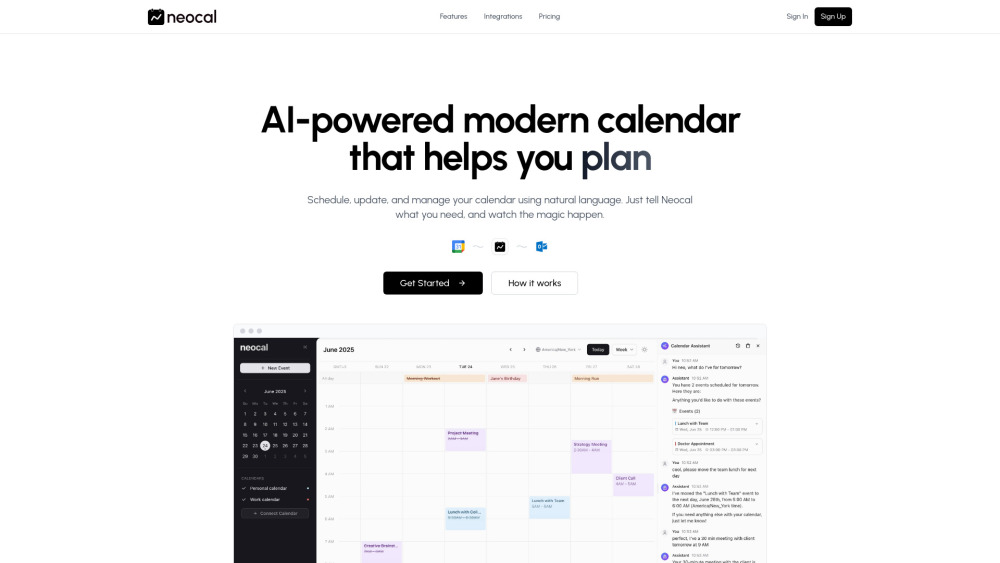
Neocal Website screenshot

What is Neocal?

Neocal is an intelligent, AI-driven calendar assistant that transforms how you manage your time. By leveraging advanced artificial intelligence, Neocal enables natural, conversational interactions with your schedule—just speak or type what you need, and let the system handle the rest. Designed for modern professionals, it syncs effortlessly with Google Calendar, offering real-time updates across devices and supporting multiple calendar accounts for individuals and teams.

How to use Neocal?

Getting started with Neocal is simple: link your Google Calendar account, then begin issuing commands in everyday language. Whether it's “Set up a brainstorming session with the marketing team this week” or “Cancel my Friday morning appointment,” Neocal interprets your intent, proposes optimized options, and executes changes instantly. All updates reflect immediately on your connected calendars, keeping your entire workflow in sync without manual input.

🟢

Neocal - Key Features

Key Features From Neocal

Conversational Calendar Control via Natural Language Input

AI-Powered Time Optimization to Detect Free Slots and Prevent Overlaps

Instant Schedule Inquiries with Real-Time Responses

Automatic Time Zone Adjustment for Cross-Regional Collaboration

One-Step Event Editing (reschedule, delete, modify) Using Voice or Text

Adaptive Learning of User Habits and Scheduling Preferences

Bi-Directional Sync with Google Calendar for Consistent Updates

Multi-Account Support for Personal and Professional Calendars

Neocal's Use Cases

Organize team check-ins by saying “Book weekly standups every Monday at 9”

Discover mutual availability with “Find a time next week when Alex, Jamie, and I are all free”

Quickly retrieve event details like “Where is my 2 PM meeting?”

Coordinate global meetings using local times: “Schedule a call with Berlin at their 11 AM”

Adjust plans on the fly: “Move today’s workout to Thursday afternoon”

Automate recurring tasks based on routine: “Start my monthly planning session”

🟢

Neocal - Frequently Asked Questions

FAQ from Neocal

What is Neocal?

What calendars does Neocal integrate with?

How does Neocal handle time zones?

Can I update or cancel events using Neocal?

FAQ from Neocal

What is Neocal?

Neocal is an AI-powered calendar assistant that simplifies time management through natural language interaction. It lets users create, modify, and navigate their schedules using simple voice or text commands, all while syncing seamlessly with Google Calendar for consistent access across platforms and devices.

How to use Neocal?

After connecting your Google Calendar, simply tell Neocal what you'd like to do—like “Schedule dinner with Maya this weekend” or “Push back my 4 PM meeting by one hour.” The AI analyzes your request, suggests ideal solutions, and applies approved changes automatically across your calendars.

What calendars does Neocal integrate with?

Currently, Neocal offers full integration with Google Calendar, including two-way synchronization and support for multiple personal or work accounts, ensuring your digital schedule stays unified and up to date.

How does Neocal handle time zones?

Neocal intelligently detects and adjusts for different time zones, making it effortless to schedule calls and meetings with colleagues or clients around the world—just specify their local time, and Neocal handles the conversion.

Can I update or cancel events using Neocal?

Absolutely. You can edit, reschedule, or cancel any event using plain language commands such as “Delete my 5 PM task” or “Move my review meeting to Friday morning.” Changes are reflected instantly across all synced calendars.