Nametag

Nametag: ai tool Product Name Safe Login

Nametag: The ai tool for secure helpdesk identity verification. Product Name that builds trust and protects every users.

🟒

Nametag - Introduction

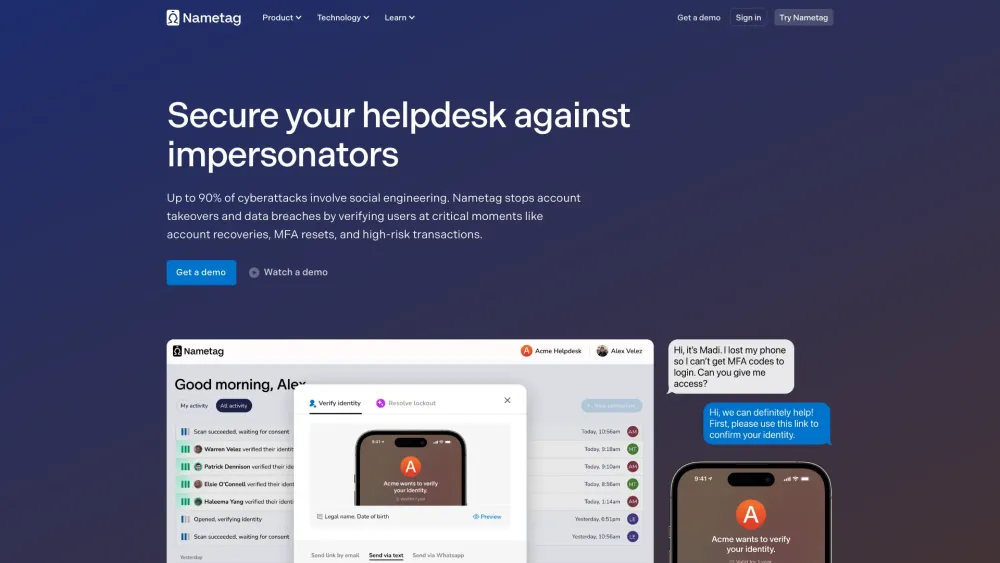
Nametag Website screenshot

What is Nametag?

Nametag is an identity verification tool that helps helpdesks confirm who they are assisting. Designed for customer and employee support, it supports safer account access, builds trust, and helps protect users from impersonation.

How to use Nametag?

Send a verification request through support chat, SMS, or a QR code. Once the user completes the process, review the verification results in real time before handling sensitive account requests or providing further assistance.

🟒

Nametag - Key Features

Key Features From Nametag

Customer identity verification

Check the identity of customers requesting support to help safeguard their accounts.

Employee identity checks

Help internal support teams verify employees before assisting with account access.

Passwordless multi-factor authentication

Support secure login with passwordless MFA, adding protection without relying on passwords alone.

Nametag's Use Cases

Help prevent account takeovers

Provide more trusted customer support

Reduce the risk of data exposure

Simplify helpdesk verification

🟒

Nametag - Frequently Asked Questions

FAQ from Nametag

What is Nametag used for?

Nametag helps helpdesks verify customers and employees so support agents can make better-informed decisions about account-related requests.

How do I use Nametag for verification?

Ask the user to complete a Nametag verification request, then check the results before proceeding with sensitive support actions.

How does Nametag support safer account access?

Nametag combines identity checks with passwordless MFA capabilities to help protect access. Support teams can send verification requests through chat, SMS, or QR codes and review status updates in real time.

What are Nametag's main features?

Its core capabilities include customer verification, employee verification, and passwordless multi-factor authentication, helping teams balance account security with a smoother support experience.