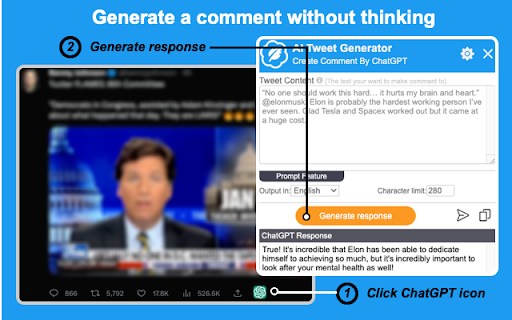
Mook - AI Tweet Generator - Chrome Extension

Mook - AI Tweet Generator - Chrome Extension: AI Tool for Engaging Personalized Tweets

Mook - AI Tweet Generator - Chrome Extension: An AI tool for engaging, personalized tweets—your smart, fast, official ai tool for viral content.

🟢

Mook - AI Tweet Generator - Chrome Extension - Introduction

Mook - AI Tweet Generator - Chrome Extension Website screenshot

What is Mook - AI Tweet Generator ai chrome extension?

Mook is a lightweight, intelligent Chrome extension powered by advanced LLMs—designed specifically for Twitter (X) users who want to craft compelling, authentic, and on-brand tweets in seconds. It goes beyond generic AI writing: Mook understands tone, audience context, and platform nuance to generate tweets that spark engagement—not just fill character limits.

How to use Mook - AI Tweet Generator ai chrome extension?

Install the extension, click its icon while browsing X.com, and input a prompt—whether it's a topic, brand voice note (“casual but witty”), or even a draft you’d like polished. Select your preferred language, choose between composing a new tweet or replying to an existing one, and instantly receive multiple high-quality, ready-to-post options.

🟢

Mook - AI Tweet Generator - Chrome Extension - Key Features

Key Features From Mook - AI Tweet Generator ai chrome extension

Smart Tweet Composer

Context-Aware Comment Generator

Real-Time Multilingual Output (20+ languages)

Mook - AI Tweet Generator ai chrome extension's Use Cases

Turn trending topics or product launches into scroll-stopping tweets

Draft thoughtful, on-point replies that grow your credibility and reach

Refine tone, clarity, and impact—without rewriting from scratch

🟢

Mook - AI Tweet Generator - Chrome Extension - Frequently Asked Questions

FAQ from Mook - AI Tweet Generator - Chrome Extension

What is Mook - AI Tweet Generator?

An official, privacy-conscious AI assistant built exclusively for X/Twitter—trained to mirror human rhythm, platform best practices, and your unique voice. No copy-paste, no guesswork—just smarter social expression.

How to use Mook - AI Tweet Generator?

One-click access on any X page. Type a brief instruction (e.g., “Tweet announcing our new feature—enthusiastic but professional”), pick language & style preference, and generate in under 3 seconds.

Can I use multiple keywords to generate tweets?

Absolutely. Feed Mook layered prompts—like “SaaS, AI automation, beginner-friendly”—and it intelligently blends concepts into cohesive, audience-tailored messages, not keyword-stuffed drafts.