Midpage - Chrome Extension

Midpage - Chrome Extension: AI tool for cited cases

Midpage - Chrome Extension: AI tool delivering instant AI insights for cited cases—right in your browser. Product Name boosts legal research efficiency.

🟢

Midpage - Chrome Extension - Introduction

Midpage - Chrome Extension Website screenshot

What is Midpage - Chrome Extension?

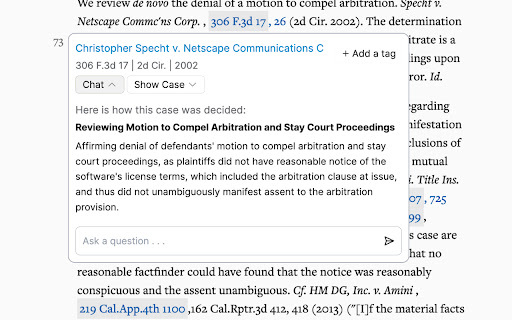
Midpage is a purpose-built AI assistant for legal professionals—embedded directly into your browser—to analyze, summarize, and validate cited cases in real time—no switching tabs or copying text required.

How to use Midpage - Chrome Extension?

Install the extension, navigate to any legal database (e.g., Westlaw, Lexis+, CourtListener), and hover over any citation—Midpage instantly surfaces contextual insights, key holdings, and relevance signals—right where you're working.

🟢

Midpage - Chrome Extension - Key Features

Key Features From Midpage - Chrome Extension

Instant AI-powered case analysis on hover

Contextual preview of cited opinion excerpts

Precision answers grounded in the full case text—not generic LLM responses

Midpage - Chrome Extension's Use Cases

Verify whether precedent actually supports your legal argument

Cut research time by eliminating unnecessary tab-hopping and manual skimming

🟢

Midpage - Chrome Extension - Frequently Asked Questions

FAQ from Midpage - Chrome Extension

What is Midpage?

A lightweight, privacy-aware Chrome extension that brings authoritative, citation-aware AI insights to legal researchers—directly inside their workflow.

How to use Midpage?

After installation, it activates automatically on supported legal sites: just hover over any case citation to unlock AI-generated context, summaries, and proposition checks.

Where does Midpage work?

Currently optimized for major online case platforms—including Google Scholar, Justia, FindLaw, and PACER. Native PDF annotation and Word integration are rolling out in Q4 2024.