Meitu Design Studio

Meitu Design Studio: AI Tool for Easy Visual Design

Meitu Design Studio: An AI tool for beginners to craft stunning e-commerce, Xiaohongshu, WeChat & marketing visuals—fast, easy, professional.

🟢

Meitu Design Studio - Introduction

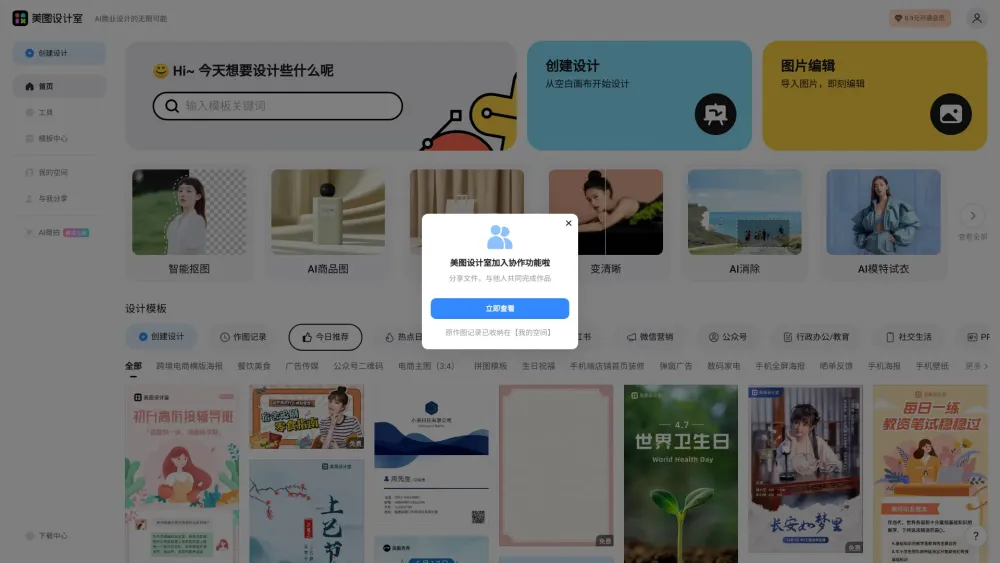
Meitu Design Studio Website screenshot

What is Meitu Design Studio?

Meitu Design Studio is an intelligent, beginner-friendly visual creation platform powered by advanced AI. Designed specifically for non-designers—especially e-commerce sellers, social media creators, and small business marketers—it transforms complex graphic design into a few intuitive clicks. Whether you're crafting high-converting product banners for Taobao or JD.com, eye-catching posts for Xiaohongshu (Little Red Book), elegant WeChat article headers, or dynamic video thumbnails, Meitu Design Studio delivers professional-grade visuals—without requiring Photoshop skills, design training, or hours of trial and error.

How to use Meitu Design Studio?

1. Launch the editor and select from hundreds of purpose-built templates—or begin with a custom canvas sized for your platform (e.g., 1242×2688 for Xiaohongshu vertical posts).
2. Personalize your design in seconds: swap text, adjust fonts, drag-and-drop elements, and apply brand-consistent color palettes.
3. Leverage smart AI tools—generate background-free product mockups, enhance low-res images, erase unwanted objects, remove third-party watermarks, and auto-resize across formats.
4. Export in multiple resolutions and formats (PNG, JPG, MP4 for animated covers), optimized for web, mobile, and print—ready to publish instantly.

🟢

Meitu Design Studio - Key Features

Key Features From Meitu Design Studio

AI-Powered One-Click Creation

Smart Template Matching (by Platform & Use Case)

Intelligent Background Removal & Object Erasure

AI Watermark Elimination

Resolution Upscaling & Image Restoration

Auto-Adaptive Layout Adjustment

Meitu Design Studio's Use Cases

Optimizing e-commerce main images for conversion

Designing scroll-stopping Xiaohongshu feed posts & carousels

Creating branded WeChat official account headers & quote cards

Producing engaging short-video cover thumbnails (Douyin, Bilibili, Kuaishou)

Building cohesive marketing campaign assets (banners, flyers, email headers)

Generating seasonal or promotional social media kits (e.g., Double 11, 618)

  • Meitu Design Studio Company

    Developed by Meitu Inc. (美图公司), a leading Chinese AI imaging technology company with over a decade of expertise in visual intelligence and creative tools.

    Learn more about Meitu's mission and innovation journey at the official Meitu website (https://www.meitu.com/).

🟢

Meitu Design Studio - Frequently Asked Questions

FAQ from Meitu Design Studio

What is Meitu Design Studio?

A next-generation AI design assistant that empowers everyday users—from solopreneurs to community managers—to produce polished, platform-optimized visuals in under 60 seconds. No design experience needed.

How to use Meitu Design Studio?

1. Pick your goal (e.g., “Xiaohongshu post” or “Taobao product banner”).
2. Choose a template or describe your idea using natural language—AI generates options instantly.
3. Refine with one-tap enhancements: change theme colors, upscale imagery, clean backgrounds, or regenerate layouts.
4. Download, share, or schedule directly to your social channels.

Can I use my own images in the designs?

Absolutely. Upload logos, product photos, or lifestyle shots—and apply AI-powered enhancements like skin retouching, lighting correction, background replacement, and seamless blending—ensuring your brand assets look studio-quality every time.