What is LingoBuddy ai chrome extension?
LingoBuddy is an intelligent, context-aware Chrome extension that delivers instant, accurate translations—right where you browse. Powered by advanced AI models, it transforms every webpage into an immersive language-learning environment: hover to translate, click to explore definitions, and learn naturally through real-world content.
How to use LingoBuddy ai chrome extension?
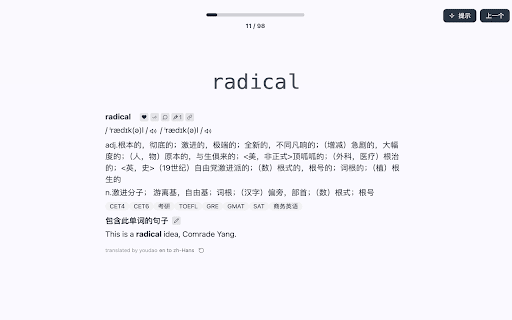
Install the extension, then highlight any word or phrase on any website—LingoBuddy instantly displays translation, pronunciation, usage examples, and grammar insights. One-click save lets you build personalized vocabulary lists, enriched with your own notes, flashcards, and spaced-repetition cues.
LingoBuddy ai chrome extension's Core Features
Real-Time Contextual Translation
Multi-Model AI Engine (GPT, Claude & Specialized NLP Models)
Smart Vocabulary Journal
Customizable Note & Example Builder
Adaptive Spaced Repetition System
LingoBuddy ai chrome extension's Use Cases
Translate and understand foreign-language news, blogs, or social media posts—without leaving the page
Turn daily browsing into active language practice: track progress, revisit tricky terms, and reinforce retention
FAQ from LingoBuddy - Chrome Extension
What is LingoBuddy?
An AI-powered browser companion designed for seamless translation and organic language acquisition—turning passive reading into active learning with intelligent, on-the-fly support.
How to use LingoBuddy?
Select any word or phrase on a webpage → see instant translation + linguistic breakdown → tap “Save” to add it to your learning dashboard with optional notes, tags, or example sentences.
How do I add notes to a saved word?
Open your LingoBuddy vocabulary journal, find the saved term, and click the “+ Add Note” button—type explanations, mnemonics, or personal associations to deepen recall and contextual understanding.