GPTsLab Browser Extension - Chrome Extension

GPTsLab Browser Extension: AI Tool for 20k+ GPT Apps

GPTsLab Browser Extension - Chrome Extension: An AI tool to access 20k+ GPT apps easily—fast, secure, and built for power users.

🟢

GPTsLab Browser Extension - Chrome Extension - Introduction

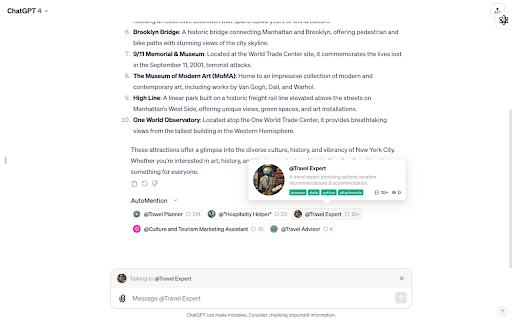
GPTsLab Browser Extension - Chrome Extension Website screenshot

What is GPTsLab Browser Extension ai chrome extension?

GPTsLab Browser Extension is a purpose-built Chrome tool that unlocks instant, one-click access to a curated ecosystem of 20,000+ ready-to-use GPT applications—designed for developers, researchers, and AI-savvy users who demand speed, reliability, and intelligent discovery—without switching tabs or logging into multiple platforms.

How to use GPTsLab Browser Extension ai chrome extension?

1. Add the extension from the Chrome Web Store in under 10 seconds. 2. Click the GPTsLab icon to open the lightweight sidebar interface. 3. Search by function (e.g., “code reviewer”, “SEO optimizer”) or explore hand-picked daily GPT app highlights. 4. Pin favorites, create custom folders, and sync your toolkit across devices—no account required.

🟢

GPTsLab Browser Extension - Chrome Extension - Key Features

Key Features From GPTsLab Browser Extension ai chrome extension

20k+ Vetted GPT Apps — Not Just Quantity, But Quality

Smart Daily Feed — Fresh, Relevant, and Context-Aware

Intent-Based Search — Find GPTs by use case, not just name

Zero-Clutter Personal Hub — Organize, tag, and launch instantly

GPTsLab Browser Extension ai chrome extension's Use Cases

AI engineers benchmarking real-world GPT implementations

Product teams rapidly prototyping with pre-trained GPT tools

🟢

GPTsLab Browser Extension - Chrome Extension - Frequently Asked Questions

FAQ from GPTsLab Browser Extension - Chrome Extension

What is GPTsLab Browser Extension?

A lightweight, secure Chrome extension engineered to serve as your unified gateway to 20,000+ production-ready GPT applications—optimized for performance, privacy-first browsing, and power-user workflows.

How to use GPTsLab Browser Extension?

Install → Activate → Discover → Save → Launch. That's it. No setup, no subscriptions, no friction—just immediate access to the world’s largest living directory of functional GPT apps.

What is the key feature of GPTsLab extension?

Instant, organized, and intelligent access to 20,000+ high-signal GPT applications—all discoverable, filterable, and actionable directly from your browser toolbar.