FunBlocks AI - Chrome Extension

FunBlocks AI - Chrome Extension: AI Tool

FunBlocks AI - Chrome Extension: An AI tool for smarter writing and reading—your ultimate AI tool, built right into Chrome.

🟢

FunBlocks AI - Chrome Extension - Introduction

FunBlocks AI - Chrome Extension Website screenshot

What is FunBlocks AI - Chrome Extension?

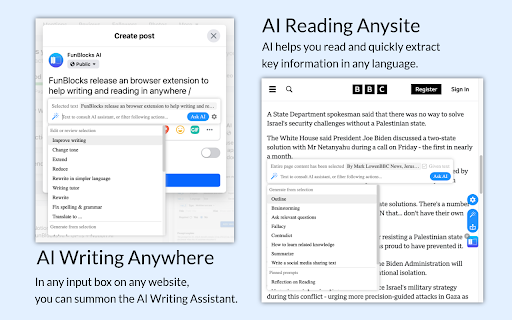
FunBlocks AI is a lightweight, intelligent Chrome extension that transforms how you write, read, and interact with online content—powered by cutting-edge AI and designed for real-world productivity, not just automation.

How to use FunBlocks AI - Chrome Extension?

Launch the AI sidebar with one click, rewrite or expand text using the floating toolbar, highlight any passage to instantly summarize or explain it, activate voice-enabled commands for hands-free assistance, and embed smart AI actions directly into Gmail, Notion, LinkedIn, and other platforms—all without switching tabs.

🟢

FunBlocks AI - Chrome Extension - Key Features

Key Features From FunBlocks AI - Chrome Extension

Smart Writing Assistant

Intelligent Reading Companion

One-Click Memo Capture

Visual AI Workflow Builder (No-Code)

FunBlocks AI - Chrome Extension's Use Cases

Drafting polished, tone-aware emails and messaging

Extracting insights and TL;DRs from long-form articles

Capturing, tagging, and organizing ideas with Memo

🟢

FunBlocks AI - Chrome Extension - Frequently Asked Questions

FAQ from FunBlocks AI - Chrome Extension

What is FunBlocks AI?

An adaptive AI companion built natively into Chrome—designed to elevate clarity in writing, deepen comprehension while reading, and empower users to build custom AI tools without coding.

How to use FunBlocks AI?

Open the sidebar, select text anywhere on the web to trigger context-aware actions, click the writing icon to refine drafts in real time, use keyboard shortcuts for instant access, and extend functionality across supported apps via seamless integrations.

Do I need to pay for using my own LLM API Key?

No. FunBlocks AI doesn't charge for API key usage—you only pay your chosen LLM provider (e.g., OpenAI, Anthropic, or Ollama) according to their pricing. FunBlocks remains free to use as a frontend interface and orchestration layer.