Expense Sorted

Expense Sorted: AI Tool for Effortless Expense Categorisation

Expense Sorted: An AI tool that automatically categorises your monthly expenses using smart AI—Product Name for effortless financial clarity.

🟢

Expense Sorted - Introduction

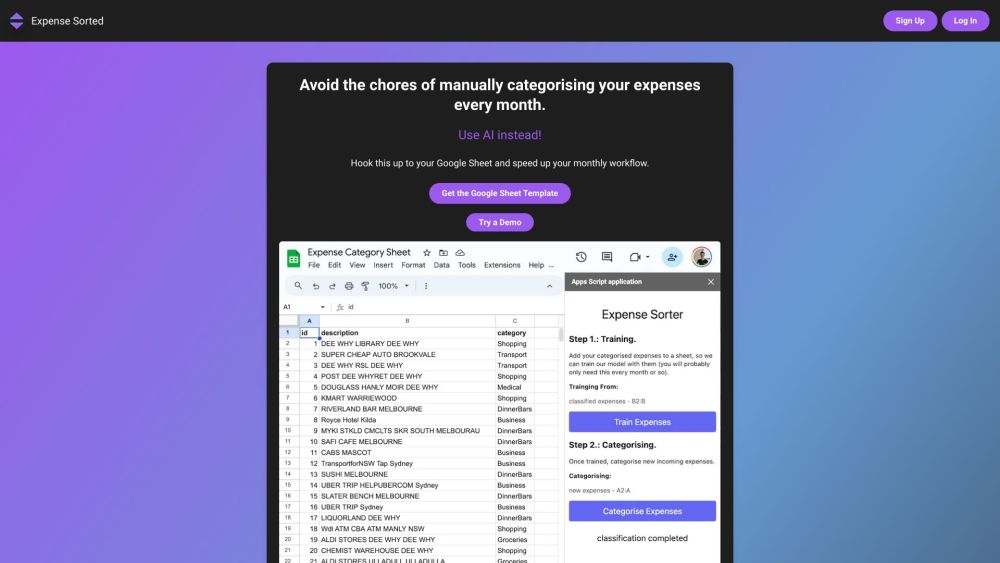
Expense Sorted Website screenshot

What is Expense Sorted?

Expense Sorted is an intelligent, no-fuss AI assistant designed to transform how you understand and manage your spending—turning raw transaction data into clear, actionable financial insights with zero manual effort.

How to use Expense Sorted?

Connect your Google Sheets in under 60 seconds—no coding, no spreadsheets juggling. Once linked, Expense Sorted instantly reads, interprets, and sorts every incoming expense into meaningful categories, so your budget stays updated, accurate, and always on point.

🟢

Expense Sorted - Key Features

Key Features From Expense Sorted

Intelligent AI Categorisation Engine

End-to-End Encrypted Google Sheets Sync (OAuth 2.0 certified)

Clean, intuitive dashboard built for speed and clarity

Context-aware transaction parsing—recognising merchants, recurring bills, and irregular spend patterns

Fully editable category system—create, rename, or group categories for personal finance or business accounting

Expense Sorted's Real-World Applications

Automated Bank & Card Transaction Tagging

Personal Finance Tracking Without the Drudgery

Smart Google Sheet Budgeting & Reporting

🟢

Expense Sorted - Frequently Asked Questions

FAQ from Expense Sorted

What is Expense Sorted?

A purpose-built AI tool that learns your spending habits and auto-categorises every expense—so you gain financial clarity, not clutter.

How to use Expense Sorted?

Authorize secure access to your Google Sheet → let the AI scan and classify transactions → review, tweak if needed → done. Budgeting just got invisible.

How secure is the connection to my Google Sheet?

Enterprise-grade security: read-only access via Google’s OAuth 2.0 protocol; no data stored, no passwords retained, no third-party sharing.

Can I customize the expense categories?

Absolutely—you own your categories. Add “Freelance Tools”, merge “Coffee & Snacks”, or build department-level tags for teams. It adapts to *you*.

Is there any manual intervention required?

Not unless you want to. The AI achieves >94% accuracy out-of-the-box—but every categorisation is editable, auditable, and fully transparent.