CVtools - Chrome Extension

CVtools - Chrome Extension: AI Tool for Productivity

CVtools - Chrome Extension: An AI tool boosting productivity with AI language models—integrated directly into your browser.

🟢

CVtools - Chrome Extension - Introduction

CVtools - Chrome Extension Website screenshot

What is CVtools ai chrome extension?

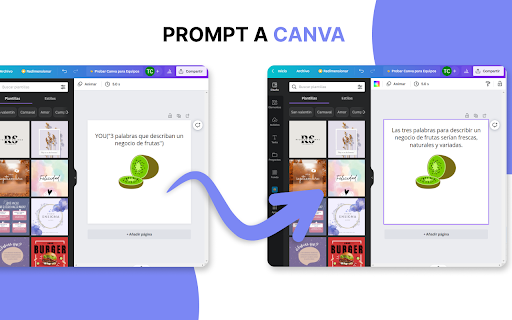
CVtools is a lightweight, intelligent Chrome extension that brings cutting-edge AI language capabilities—powered by models like GPT-3 and beyond—directly into your everyday web workflows. Seamlessly active on platforms including Gmail, Canva, Google Docs, and Google Forms, it transforms how you draft, edit, and refine content—right where you work.

How to use CVtools ai chrome extension?

Activate CVtools with simple, intuitive commands: type GPT for polished drafts, VGPT for visual-aware suggestions (e.g., in Canva), YOU to rewrite in your unique voice, or HELP for real-time guidance. No switching tabs—just highlight, command, and generate—turning minutes of writing into seconds.

🟢

CVtools - Chrome Extension - Key Features

Key Features From CVtools ai chrome extension

Browser-native AI integration

Context-aware command interface

One-click content generation & refinement

CVtools ai chrome extension's Use Cases

Cut drafting time by up to 90%

Streamline cross-platform communication & design tasks

🟢

CVtools - Chrome Extension - Frequently Asked Questions

FAQ from CVtools - Chrome Extension

What is CVtools?

An AI-augmented productivity layer built for the modern browser—designed to accelerate writing, editing, and ideation across popular web apps without leaving the page.

How to use CVtools?

Install the extension, open any supported site, and trigger AI assistance using natural-language commands. Whether replying to an email or scripting social copy in Canva, CVtools adapts instantly to your context.

How can CVtools enhance productivity?

By embedding generative AI directly into your workflow—eliminating app-switching, reducing cognitive load, and delivering high-fidelity output on demand—it turns routine writing into a fast, frictionless, and intelligent process.