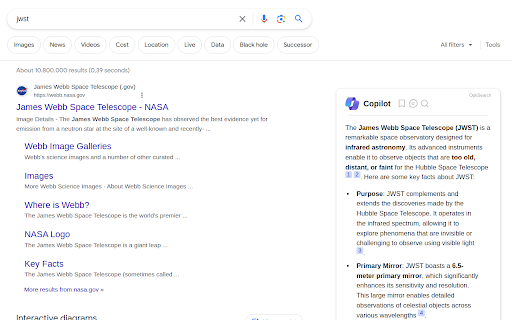
Copilot Browser Extension - Chrome Extension

Copilot Browser Extension: AI Tool for Instant Summaries Next to Google Results

Copilot Browser Extension - Chrome Extension: An AI tool that delivers instant AI summaries next to Google results—fast, smart, seamless.

🟢

Copilot Browser Extension - Chrome Extension - Introduction

Copilot Browser Extension - Chrome Extension Website screenshot

What is Copilot Browser Extension ai chrome extension?

Copilot Browser Extension is a lightweight, intelligent Chrome add-on that surfaces AI-powered summaries—powered by Microsoft Copilot—directly alongside your Google search results. No switching tabs, no manual queries: just concise, context-aware insights anchored to each result in real time.

How to use Copilot Browser Extension ai chrome extension?

Install the extension from the Chrome Web Store, enable it with one click, and begin searching on Google as usual. Instantly, AI-generated summaries appear in a clean, unobtrusive sidebar next to each organic result—helping you evaluate relevance, grasp key points, and decide faster.

🟢

Copilot Browser Extension - Chrome Extension - Key Features

Key Features From Copilot Browser Extension ai chrome extension

Real-time AI summarization alongside search results

Adaptive response generation—concise, factual, and source-grounded

Native support for Google, Bing, and DuckDuckGo

Seamless dark/light mode synchronization with your browser

Copilot Browser Extension ai chrome extension's Use Cases

Accelerate research with on-the-fly content distillation

Streamline decision-making during competitive analysis or academic discovery

🟢

Copilot Browser Extension - Chrome Extension - Frequently Asked Questions

FAQ from Copilot Browser Extension - Chrome Extension

What is Copilot Browser Extension?

An intelligent Chrome extension that integrates Microsoft Copilot's large language model directly into your Google search experience—delivering instant, trustworthy summaries without leaving the page.

How to use Copilot Browser Extension?

After installation, it activates automatically. Just type your query into Google—the AI summary panel appears instantly beside top results, requiring zero extra input or navigation.

How to customize conversation style?

Access the extension’s popup menu to select your preferred tone: Balanced (default), Precise (for technical or factual clarity), or Creative (for exploratory or brainstorming contexts).