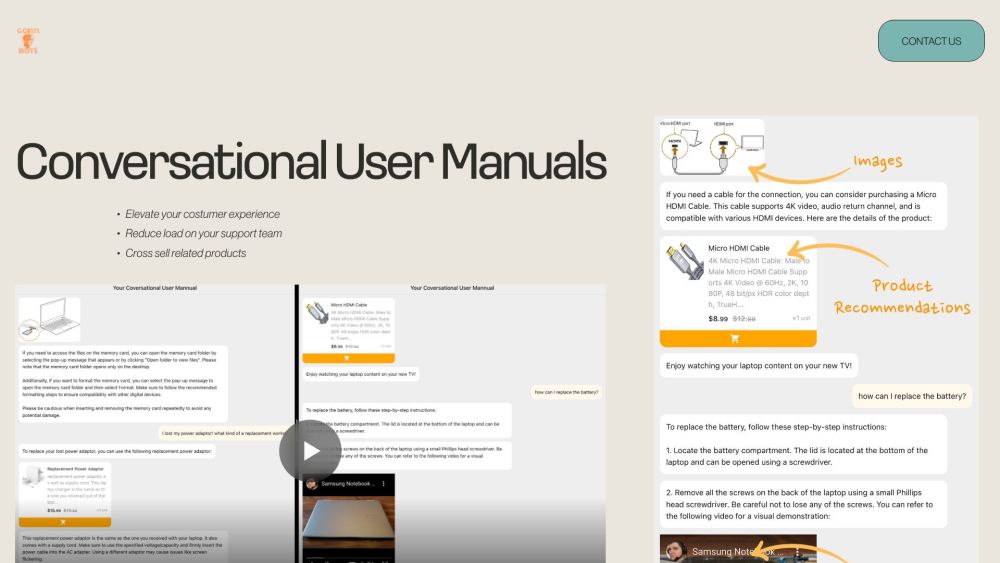
What is Conversational User Manuals?
Conversational User Manuals is an AI-powered QR product answers tool that gives customers quick, helpful support after they purchase a product. Add a QR code to your packaging, instruction sheet, or product label, and customers can scan it to ask questions and discover relevant answers, images, videos, and product suggestions. Improve the post-purchase experience while helping your support team manage fewer repetitive requests and creating opportunities to promote related products.
How to use Conversational User Manuals?
Start by adding your available product resources, such as manuals, setup instructions, FAQs, screenshots, videos, and product catalogs. The platform creates a QR code that you can print on the box or attach to the product with a sticker. When customers need assistance, they scan the code and ask questions in natural language. The AI tool provides clear product answers along with useful visual content and recommendations based on the information you provide.
Conversational User Manuals's Core Features
AI-powered product answers
Step-by-step text guidance
Helpful images and videos
Related product recommendations
FAQ from Conversational User Manuals
What is Conversational User Manuals?
It is a QR-enabled AI support solution that lets customers scan a code and receive answers about your products. It can combine written explanations, images, videos, and related product recommendations in one convenient experience.
How does the QR product answers tool work?
You provide your product information and digital resources, then place the generated QR code on your packaging or product. Customers scan the code whenever they have a question and interact with the AI tool to find relevant guidance and supporting media.
What information do you need to get started?
You can supply existing user manuals, product instructions, PDFs, images, screenshots, frequently asked questions, videos, and details about other products in your catalog. These materials help the tool deliver more useful and accurate answers.
Can it help reduce customer support requests?
Yes. Customers can find immediate answers to common questions without waiting for a support response. This can reduce repetitive inquiries, improve product understanding, and give your team more time to handle complex customer needs.
How can I learn more?
If you would like to add conversational QR support to your products, share your contact details and information about your company and product range. The team can provide more information about the setup and possible use cases.