Clodura - Chrome Extension

Clodura - Chrome Extension: AI Tool for Effortless Contact Management

Clodura - Chrome Extension: An AI tool to manage contacts effortlessly—integrate Clodura's Chrome extension for seamless, smart contact management.

🟢

Clodura - Chrome Extension - Introduction

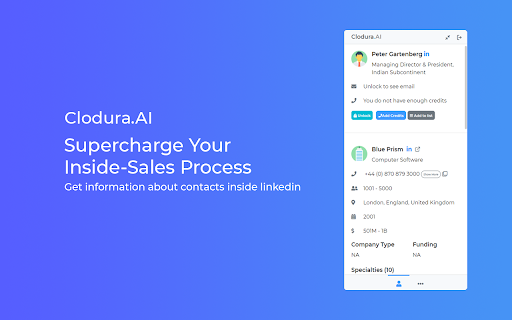
Clodura - Chrome Extension Website screenshot

What is Clodura ai chrome extension?

Clodura's Chrome Extension is an intelligent, AI-powered assistant that captures and enriches contact and company data directly from LinkedIn, corporate websites, and other web sources—automatically syncing it into your Clodura.AI workspace for unified, intelligent contact management.

How to use Clodura ai chrome extension?

After installing the extension, browse any professional profile or company page, click the Clodura icon in your browser toolbar, and instantly capture enriched details—including verified emails, direct dials, tech stack, hiring signals, and more—all pre-processed by AI and ready for action in Clodura.AI.

🟢

Clodura - Chrome Extension - Key Features

Key Features From Clodura ai chrome extension

AI-verified email addresses with deliverability scoring

One-click retrieval of direct phone numbers

Discovery of related decision-makers and team members

Real-time technology footprint analysis (e.g., CRM, ATS, cloud stack)

Insights into active projects, funding stage, and expansion signals

Identification of priority hiring functions and open roles

Smart deduplication and relationship mapping across accounts

Clodura ai chrome extension's Use Cases

Enrich outbound prospecting with verified, context-rich contact profiles

Bulk-add and auto-enrich leads from LinkedIn Sales Navigator or search results

Accelerate account research with AI-curated intelligence before outreach or meetings

🟢

Clodura - Chrome Extension - Frequently Asked Questions

FAQ from Clodura - Chrome Extension

What is Clodura?

Clodura is an AI-native contact and account intelligence platform—and its Chrome Extension acts as your real-time data bridge, transforming passive browsing into proactive, insight-driven relationship building.

How to use Clodura?

Install the extension from the Chrome Web Store, log in to your Clodura.AI account, then activate it on any LinkedIn profile, Crunchbase page, or company website to instantly extract and enrich actionable contact intelligence.

How to add contacts using the Chrome extension?

Select a person or company, click the Clodura icon, choose enrichment options (e.g., email + tech stack), and confirm—your data syncs securely to Clodura.AI with full AI validation and contextual metadata.