ChatOverflow - Chrome Extension

ChatOverflow - Chrome Extension: AI Tool

ChatOverflow - Chrome Extension: An AI tool that delivers ChatGPT's answers directly on StackOverflow—fast, smart, seamless.

🟢

ChatOverflow - Chrome Extension - Introduction

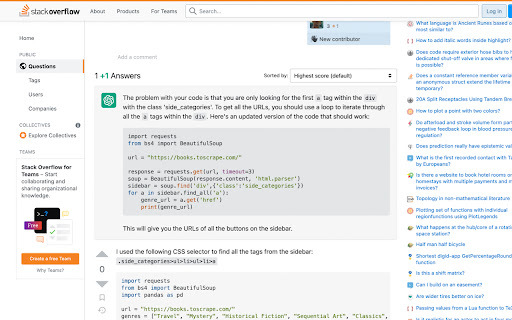
ChatOverflow - Chrome Extension Website screenshot

What is ChatOverflow ai chrome extension?

ChatOverflow is a lightweight, intelligent Chrome extension that brings real-time, AI-powered answers—powered by ChatGPT—directly into StackOverflow's interface, transforming how developers research, debug, and learn.

How to use ChatOverflow ai chrome extension?

Add ChatOverflow from the Chrome Web Store (or manually load the unpacked extension), toggle it on for stackoverflow.com, and watch AI insights appear alongside questions—no switching tabs, no copy-pasting, no delays.

🟢

ChatOverflow - Chrome Extension - Key Features

Key Features From ChatOverflow ai chrome extension

Instant inline ChatGPT responses

Circumvents StackOverflow’s AI-answer restrictions gracefully

ChatOverflow ai chrome extension's Use Cases

Accelerating resolution of complex, low-visibility technical queries

🟢

ChatOverflow - Chrome Extension - Frequently Asked Questions

FAQ from ChatOverflow - Chrome Extension

What is ChatOverflow?

A smart browser extension that surfaces ChatGPT-generated explanations and code solutions right inside StackOverflow question pages—designed exclusively for developers who value speed, accuracy, and context-aware assistance.

How to use ChatOverflow?

Once installed, activate the extension on any StackOverflow page—responses automatically populate beneath questions, fully integrated and visually distinct.

How to install the extension?

Grab the latest release from the official GitHub repository, follow Chrome’s “Load unpacked” instructions, or install via the Chrome Web Store when available.