ChatGpt Popup - Chrome Extension

ChatGpt Popup - Chrome Extension: AI Tool

ChatGpt Popup - Chrome Extension: An AI tool for seamless chatting—install this Chrome extension to chat instantly via popup.

🟢

ChatGpt Popup - Chrome Extension - Introduction

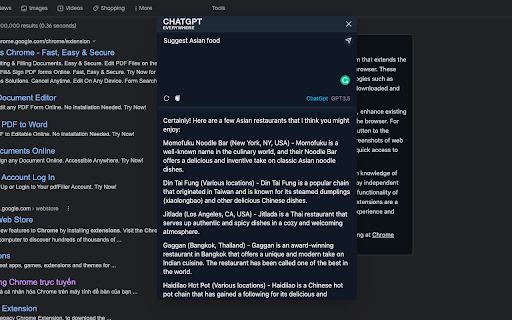
ChatGpt Popup - Chrome Extension Website screenshot

What is ChatGpt Popup - Chrome Extension?

ChatGpt Popup is a lightweight, privacy-conscious Chrome extension that brings ChatGPT's conversational power directly into your browser—no tab switching, no login redirects. With one click, launch an elegant, floating AI chat window anywhere you browse.

How to use ChatGpt Popup - Chrome Extension?

After installing from the Chrome Web Store, click the extension icon in your toolbar to open the popup—then start typing your question or prompt. It works instantly on any webpage, even while you’re reading, shopping, or researching.

🟢

ChatGpt Popup - Chrome Extension - Key Features

Key Features From ChatGpt Popup - Chrome Extension

One-Click AI Conversations

Launch a responsive, self-contained ChatGPT interface without leaving your current page.

Context-Aware & Lightweight

Built for speed and minimal footprint—no background scripts slowing down your browser.

ChatGpt Popup - Chrome Extension's Use Cases

Instant clarification while browsing

Clarify technical terms, summarize articles, or translate snippets—right where you need them.

Rapid ideation & drafting

Brainstorm email replies, social posts, or code snippets without disrupting your workflow.

🟢

ChatGpt Popup - Chrome Extension - Frequently Asked Questions

FAQ from ChatGpt Popup - Chrome Extension

What is ChatGpt Popup?

A smart, minimalist Chrome extension that delivers real-time ChatGPT interactions through an intuitive popup—designed for focus, not friction.

How to use ChatGpt Popup?

Click the puzzle-piece icon in your browser toolbar, type your message in the popup, and get instant, high-quality AI responses—no setup required.

How to install the extension?

Visit the official Chrome Web Store listing, click “Add to Chrome”, and confirm. The extension activates immediately—ready to assist in under 10 seconds.