ChatGPT Easy Folders - Chrome Extension

ChatGPT Easy Folders: AI Tool for ChatGPT

ChatGPT Easy Folders - Chrome Extension: An AI tool that supercharges ChatGPT with smart folder organization—directly in your browser.

🟢

ChatGPT Easy Folders - Chrome Extension - Introduction

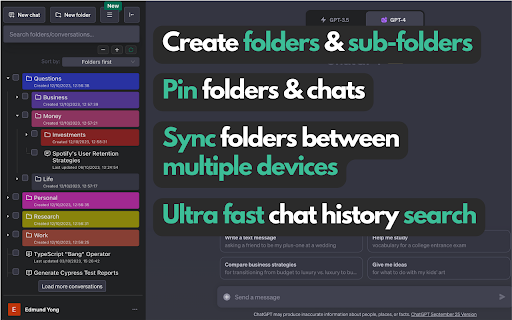
ChatGPT Easy Folders - Chrome Extension Website screenshot

What is ChatGPT Easy Folders ai chrome extension?

ChatGPT Easy Folders is a lightweight, privacy-conscious Chrome extension designed to bring structure and intelligence to your ChatGPT experience—transforming chaotic chat histories into well-organized, searchable, and reusable AI workflows—all without leaving your browser.

How to use ChatGPT Easy Folders ai chrome extension?

Add the extension from the Chrome Web Store, log in (optional), create topic-based folders, drag-and-drop conversations into them, activate the built-in AI Copilot for real-time suggestions, and instantly access or adapt prompts from your personal library.

🟢

ChatGPT Easy Folders - Chrome Extension - Key Features

Key Features From ChatGPT Easy Folders ai chrome extension

Smart Folder Management

AI Copilot Assistant (in-context suggestions)

Curated & Custom Prompt Library

Reusable Prompt Templates (role-based, task-specific)

Encrypted Local Backup + Full-Text Search

ChatGPT Easy Folders ai chrome extension's Use Cases

Tidy up years of ChatGPT chats by project, client, or learning goal

Launch focused, high-signal conversations with one-click prompt insertion

Build, test, and iterate personalized prompt stacks for work or creativity

🟢

ChatGPT Easy Folders - Chrome Extension - Frequently Asked Questions

FAQ from ChatGPT Easy Folders - Chrome Extension

What is ChatGPT Easy Folders?

An intelligent, browser-native organizer for ChatGPT—blending folder logic, AI guidance, and prompt engineering tools into a single seamless extension.

How to use ChatGPT Easy Folders?

Install → organize → engage. Create folders, auto-sync ongoing chats, summon the AI Copilot for drafting help, and browse or search your growing prompt collection—no setup or external accounts required.

Is user data collected?

No conversation content, prompts, or folder structures are sent to servers. Only your email (if you choose to sign in) is stored securely for sync continuity and optional feature updates.