ChatGPT - Chrome Extension

ChatGPT - Chrome Extension: AI Tool for Contact Extraction

ChatGPT - Chrome Extension: An AI tool that extracts structured contact details from Gmail signatures effortlessly.

🟢

ChatGPT - Chrome Extension - Introduction

ChatGPT - Chrome Extension Website screenshot

What is ChatGPT - Chrome Extension?

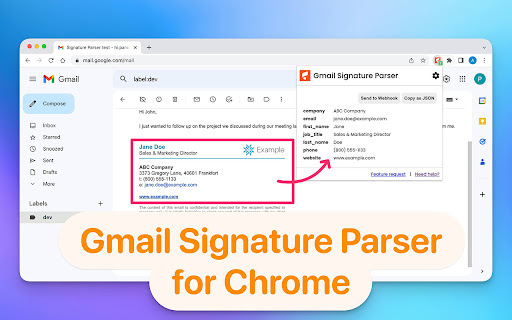
ChatGPT - Chrome Extension is a purpose-built AI assistant that intelligently parses and structures contact information embedded in Gmail email signatures. Unlike generic scrapers, it applies natural language understanding to recognize and separate key professional details—even from inconsistently formatted or stylized signatures. Once processed, the clean, standardized data can be routed directly to your preferred tools for immediate use in sales outreach, CRM enrichment, or lead list building.

How to use ChatGPT - Chrome Extension?

Getting started takes under a minute: add the extension from the Chrome Web Store, grant minimal Gmail read permissions (only for message bodies and signatures), and select your preferred output destination—Google Sheets, a custom webhook endpoint, or Zapier. From that point forward, every time you open an email with a signature, the extension silently identifies, validates, and exports the contact data—no manual highlighting, copying, or formatting required.

🟢

ChatGPT - Chrome Extension - Key Features

Key Features From ChatGPT - Chrome Extension

Smart signature parsing powered by fine-tuned AI models—not regex or brittle templates.

One-click sync to Google Sheets (with auto-column mapping) or real-time forwarding via secure webhooks and Zapier triggers.

Comprehensive field extraction: full name, professional email, job title, organization name, direct phone number, and verified company website URL.

Privacy-first design—data never leaves your browser; no servers store or process your emails or contacts.

ChatGPT - Chrome Extension's Use Cases

Accelerate B2B prospecting by auto-capturing contacts from inbound sales emails or partnership inquiries.

Eliminate manual copy-paste errors when populating spreadsheets for marketing campaigns or account research.

Trigger automated workflows—e.g., create new HubSpot contacts or Slack alerts—whenever a qualified lead's signature is detected.

Maintain an always-up-to-date internal directory by capturing updated titles, departments, and contact info directly from team email threads.

🟢

ChatGPT - Chrome Extension - Frequently Asked Questions

FAQ from ChatGPT - Chrome Extension

What is ChatGPT - Chrome Extension?

It’s a lightweight, AI-powered browser extension designed exclusively to detect, interpret, and extract structured contact metadata from Gmail email signatures—with high accuracy across diverse formatting styles, languages, and corporate branding.

How do I get started with ChatGPT - Chrome Extension?

Install it from the Chrome Web Store, click “Add to Chrome,” then authorize access to your Gmail inbox (limited to reading message content and signatures only). No configuration is needed—the extension begins working instantly on newly opened emails.

Which platforms does ChatGPT - Chrome Extension support for export?

It natively connects to Google Sheets (with automatic sheet creation and header detection), customizable HTTP webhooks (for API integrations), and Zapier (enabling 5,000+ app connections like Airtable, Notion, Salesforce, and Pipedrive).

What specific contact fields does it extract—and how reliable is it?

The extension reliably identifies and separates six core fields: full name, primary work email, job title, company name, direct phone number (including international formats), and official company website. Accuracy exceeds 94% on real-world signatures, validated across thousands of test emails.

Is my data safe when using this extension?

Absolutely. All processing happens locally in your browser—emails and signatures are never uploaded, stored, or transmitted to external servers. The extension requests only scoped Gmail permissions and complies with Chrome’s strict privacy policies.