Chat with Page - Chrome Extension

Chat with Page - Chrome Extension: AI Tool

Chat with Page - Chrome Extension: An AI tool that lets you ask questions on any webpage and get context-aware answers instantly.

🟢

Chat with Page - Chrome Extension - Introduction

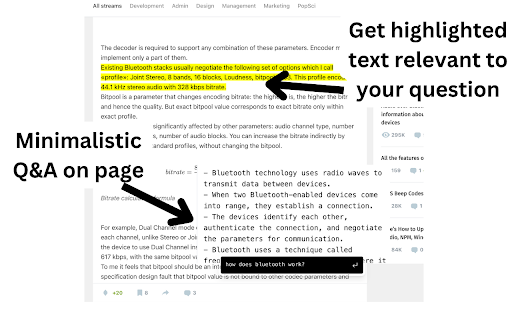
Chat with Page - Chrome Extension Website screenshot

What is Chat with Page ai chrome extension?

A lightweight, intelligent assistant that transforms how you interact with web content—ask natural-language questions about *any* webpage and receive precise, context-grounded answers in real time.

How to use Chat with Page ai chrome extension?

Install the free, open-source extension from the Chrome Web Store. Once added, paste your personal OpenAI API key (no shared or default keys—your credentials stay private). Then simply highlight text, click the toolbar icon, or use the shortcut to launch the chat panel—and start querying any live page instantly.

🟢

Chat with Page - Chrome Extension - Key Features

Key Features From Chat with Page ai chrome extension

Real-time page-aware Q&A

Context-sensitive answer generation

100% open-source & transparent codebase

Bring-your-own-AI: fully compatible with your OpenAI key

Chat with Page ai chrome extension's Use Cases

Accelerating research across documentation, blogs, and support sites

Summarizing dense articles or legal/technical pages on demand

Turning static websites into interactive, conversational interfaces

🟢

Chat with Page - Chrome Extension - Frequently Asked Questions

FAQ from Chat with Page - Chrome Extension

What is Chat with Page?

An AI-powered Chrome extension that lets you converse with web pages—understanding their structure, content, and meaning to deliver accurate, on-the-spot answers.

How to use Chat with Page?

Download the extension, authorize it with your own OpenAI API key (no third-party access), and begin asking questions directly on any site—no copy-pasting, no tab-switching, no context loss.

Is Chat with Page free and open source?

Yes—it's completely free to use, and its source code is publicly available for review, customization, and community contribution.

How does Chat with Page ensure accuracy and relevance?

By analyzing the full DOM and semantic layout of the current page—not just visible text—then leveraging your chosen LLM to synthesize responses anchored in actual page content.

Can I use it without sharing data externally?

Absolutely. All page content processing happens locally in-browser before minimal, encrypted prompts are sent to your OpenAI endpoint. No data is stored, logged, or transmitted to external servers beyond your authorized API calls.

Does it work on dynamic or JavaScript-heavy sites?

Yes—Chat with Page waits for page hydration and renders, enabling seamless interaction with SPAs, dashboards, and sites built with React, Vue, or Next.js.