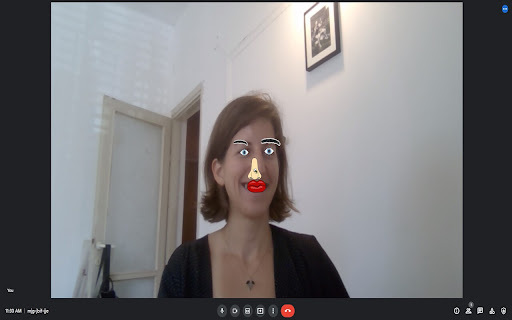
Cartoon Overlay - Chrome Extension

Cartoon Overlay - Chrome Extension: AI Tool

Cartoon Overlay - Chrome Extension: An AI tool that overlays cartoon parts on faces in videos—fun, fast, and fully browser-based.

🟢

Cartoon Overlay - Chrome Extension - Introduction

Cartoon Overlay - Chrome Extension Website screenshot

What is Cartoon Overlay ai chrome extension?

Cartoon Overlay is a lightweight, AI-powered Chrome extension that detects faces in real time or from uploaded videos—and instantly superimposes expressive, stylized cartoon elements (like oversized eyes, silly hats, animated mustaches, or playful masks) directly onto them—no downloads, no servers, all processed securely inside your browser using face-api.js and p5.js.

How to use Cartoon Overlay ai chrome extension?

Simply install the extension, open any video page (Zoom, Teams, Loom, or local MP4 uploads), click the Cartoon Overlay icon, choose your favorite cartoon components, adjust size, position, and timing—and hit “Render” to generate a shareable, cartoon-enhanced version of your video—in seconds.

🟢

Cartoon Overlay - Chrome Extension - Key Features

Key Features From Cartoon Overlay ai chrome extension

Real-time face-aware cartoon rendering

Drag-and-drop customization of cartoon parts

One-click export in MP4 with preserved audio

Cartoon Overlay ai chrome extension's Use Cases

Spicing up remote team standups and client demos

Producing lighthearted social clips and educational explainers

🟢

Cartoon Overlay - Chrome Extension - Frequently Asked Questions

FAQ from Cartoon Overlay - Chrome Extension

What is Cartoon Overlay?

A privacy-first, browser-native AI tool that transforms facial video content into playful cartoon experiences—zero data leaves your device.

How to use Cartoon Overlay?

Install the extension → launch it on a video → select and tweak cartoon assets → preview → export. No sign-up, no watermark, no latency.

Can I use my own cartoon drawings for overlay?

Absolutely—you can import SVG or PNG files as custom overlays, scale them dynamically, and save them to your personal library for future use.