Call eXplorer - Chrome Extension

Call eXplorer - Chrome Extension: AI tool for Google Meet transcripts & summaries

Call eXplorer - Chrome Extension: An AI tool that enhances Google Meet with live transcripts and summaries—powered by Call eXplorer.

🟢

Call eXplorer - Chrome Extension - Introduction

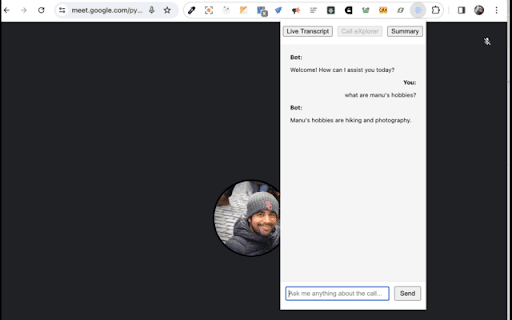
Call eXplorer - Chrome Extension Website screenshot

What is Call eXplorer ai chrome extension?

Call eXplorer is a smart, lightweight Chrome extension designed exclusively for Google Meet—transforming every virtual meeting into an intelligent, accessible, and actionable experience through real-time AI-powered transcription, contextual summarization, and on-demand Q&A.

How to use Call eXplorer ai chrome extension?

Simply add Call eXplorer from the Chrome Web Store, launch Google Meet, and click the extension icon to activate live transcription and AI summary generation—no setup, no delays, just seamless intelligence during your call.

🟢

Call eXplorer - Chrome Extension - Key Features

Key Features From Call eXplorer ai chrome extension

Real-Time Transcription

AI-Generated Meeting Summaries

Smart Q&A Based on Meeting Content

Call eXplorer ai chrome extension's Use Cases

Supporting inclusive participation with accurate, scrollable live transcripts

Saving time with concise, action-oriented summaries post-meeting

🟢

Call eXplorer - Chrome Extension - Frequently Asked Questions

FAQ from Call eXplorer - Chrome Extension

What is Call eXplorer?

An AI-native Chrome extension built to elevate Google Meet—delivering live transcription, intelligent summarization, and instant, context-aware answers—all within your browser.

How to use Call eXplorer?

After installation, join any Google Meet session, click the Call eXplorer icon in your toolbar, and toggle on transcription and summary modes—your AI meeting assistant activates instantly.

How to install Call eXplorer?

Go to the Chrome Web Store, search for “Call eXplorer”, verify the official publisher, and click “Add to Chrome”—it's ready in under 10 seconds.