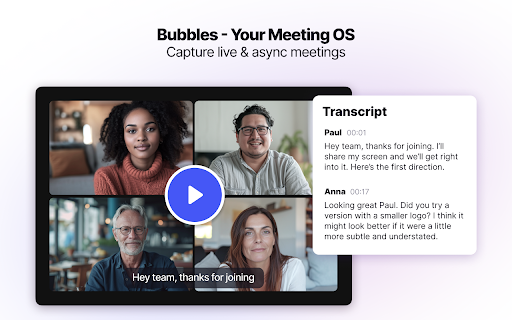
Bubbles - Chrome Extension

Bubbles - Chrome Extension: AI Tool for Productivity

Bubbles - Chrome Extension: Free screen recorder & AI meeting notetaker—powerful ai tool for effortless productivity.

🟢

Bubbles - Chrome Extension - Introduction

Bubbles - Chrome Extension Website screenshot

What is Bubbles ai chrome extension?

Bubbles is an intelligent, all-in-one Chrome extension that merges seamless screen capture with AI-powered meeting intelligence—transforming live discussions, demos, and collaborative sessions into clear summaries, actionable insights, and follow-up tasks—without manual effort.

How to use Bubbles ai chrome extension?

Install the free Bubbles extension from the Chrome Web Store, click the bubble icon to begin recording or join a meeting, and watch as real-time AI transcribes speech, identifies decisions, extracts key points, and auto-generates next steps—all in seconds.

🟢

Bubbles - Chrome Extension - Key Features

Key Features From Bubbles ai chrome extension

One-click screen & tab recording

Smart AI meeting transcription & summarization

Auto-detected action items with assignee suggestions

Bubbles ai chrome extension's Use Cases

Documenting remote team syncs and client calls

Preserving design critiques and product feedback loops

🟢

Bubbles - Chrome Extension - Frequently Asked Questions

FAQ from Bubbles - Chrome Extension

What is Bubbles?

Bubbles is a lightweight, privacy-conscious Chrome extension that combines high-fidelity screen recording with generative AI—not just to capture what's said, but to clarify what matters and drive accountability.

How to use Bubbles?

After installing the extension, activate it before any browser-based meeting (Zoom, Google Meet, Teams, etc.) or workflow session. Bubbles records audio + visuals, then delivers a structured, editable recap—including timestamps, speaker labels, and prioritized action items—right in your dashboard.

Is Bubbles available on mobile devices?

Yes—Bubbles offers native iOS and Android apps that sync seamlessly with your Chrome extension history, so your notes, recordings, and tasks stay unified across desktop and mobile.