Boloo - Chrome Extension

Boloo - Chrome Extension: AI Tool for bol.com

Boloo - Chrome Extension: Supercharge your bol.com business with this AI tool—Boloo - Chrome Extension boosts efficiency, insights & sales.

🟢

Boloo - Chrome Extension - Introduction

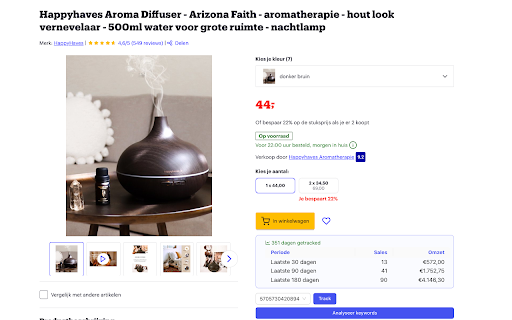
Boloo - Chrome Extension Website screenshot

What is Boloo - Chrome Extension?

Boloo is an intelligent, AI-powered Chrome extension built exclusively for bol.com sellers—designed to transform how you research, analyze, and optimize your listings with real-time data, predictive insights, and automation at your fingertips.

How to use Boloo - Chrome Extension?

Install the extension and log in to your bol.com seller dashboard. Instantly uncover high-demand, low-competition products using AI-driven trend analysis. Automate responses to common buyer questions with smart reply suggestions powered by contextual understanding. Track live sales velocity, stock movement, and ranking shifts via the integrated Product Tracker. Browse a continuously updated database of top-performing items filtered by revenue potential, review sentiment, and category growth. Run precise profitability simulations—including FBA fees, VAT, and logistics costs—with the dynamic Profit Calculator.

🟢

Boloo - Chrome Extension - Key Features

Key Features From Boloo - Chrome Extension

AI-Powered Product Research

Smart Customer Inquiry Assistant

Real-Time Product Tracker

Curated Product Intelligence Database

Multi-Variable Profit Calculator

Boloo - Chrome Extension's Use Cases

Spot emerging product opportunities before competitors

Reduce response time and improve customer satisfaction scores

Detect performance trends and adjust pricing or inventory proactively

Validate niche viability with historical sales and review analytics

Forecast net margins with scenario-based financial modeling

🟢

Boloo - Chrome Extension - Frequently Asked Questions

FAQ from Boloo - Chrome Extension

What is Boloo?

An AI-native Chrome extension engineered for bol.com sellers—turning raw marketplace data into actionable growth strategies through intelligent automation and deep platform integration.

How to use Boloo?

After installation, activate Boloo directly on any bol.com product or category page. Launch AI research reports, generate reply drafts for messages in your Seller Center, pin key SKUs to your personal tracker, explore vetted product leads in the database, and instantly calculate post-fee profitability—all without switching tabs or exporting spreadsheets.

How can I use Boloo's Product Tracker effectively?

Add products with one click using the Boloo Buddy toolbar button while browsing bol.com. Then monitor daily sales estimates, price history, rating fluctuations, and competitor listing changes—all visualized in intuitive, export-ready dashboards inside your extension popup.