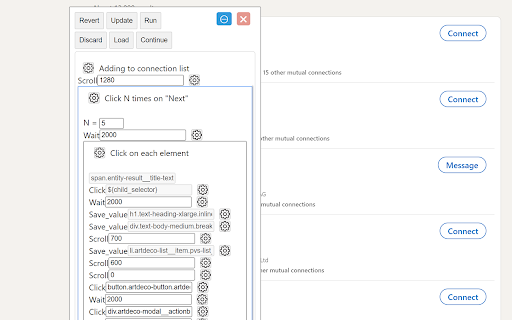
What is Automation Easy ai chrome extension?
Automation Easy is an intelligent, no-code Chrome extension that transforms how you interact with the web—leveraging AI to record, adapt, and execute repetitive online workflows with precision, speed, and contextual awareness.
How to use Automation Easy ai chrome extension?
1. Record your browser actions in real time—clicks, scrolls, inputs, and navigation. 2. Enhance recordings with smart variables, conditional triggers, and auto-detected selectors. 3. Activate embedded AI chat to interpret pages, generate responses, or guide multi-step tasks. 4. Run, schedule, or share automations across teams—all from a single, intuitive toolbar icon.
Automation Easy ai chrome extension's Core Features
Intelligent Scenario Recording & One-Click Replay
AI-Augmented Web Data Extraction
Context-Aware Chat Integration (ChatGPT & Beyond)
Adaptive Logic Engine — Loops, Conditions, Delays
Cross-Site Workflow Portability & Reusability
Developer-Ready Extensibility (Custom JS, APIs, Hooks)
Automation Easy ai chrome extension's Use Cases
Auto-filling job applications across dozens of portals
Harvesting structured product or pricing data for competitive analysis
Building personalized outreach sequences with dynamic content injection
FAQ from Automation Easy - Chrome Extension
What is Automation Easy?
An AI-native Chrome extension designed for professionals who need reliable, scalable, and adaptable web automation—without writing code or maintaining fragile scripts.
How to use Automation Easy?
1. Click “Record” and perform any task in your browser.
2. Refine the flow using AI suggestions and variable placeholders.
3. Add conversational AI steps to handle unstructured inputs or decisions.
4. Deploy instantly—locally or across your team's browsers.
Can Automation Easy handle complex interactions?
Absolutely. From CAPTCHA-aware navigation and iframe traversal to DOM mutation detection and JavaScript-injected logic, it supports enterprise-grade automation—while keeping the UI simple for everyday users.