Archie.AI - Chrome Extension

Archie.AI: AI Tool for Instant GA Data

Archie.AI - Chrome Extension: An AI tool that lets you access Google Analytics data instantly—right from your browser. Product Name.

🟢

Archie.AI - Chrome Extension - Introduction

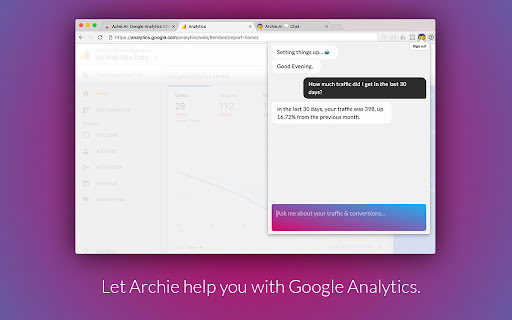
Archie.AI - Chrome Extension Website screenshot

What is Archie.AI ai chrome extension?

Archie.AI brings Google Analytics to your fingertips—no more switching tabs, logging in, or navigating complex reports. With this smart Chrome extension, your GA4 data lives inside your browser, ready to answer questions in real time.

How to use Archie.AI ai chrome extension?

Add the Archie.AI extension from the Chrome Web Store, authenticate using your Google account (the same one linked to your GA4 property), and start typing natural-language queries—like “How did mobile traffic perform yesterday?”—directly in the sidebar chat.

🟢

Archie.AI - Chrome Extension - Key Features

Key Features From Archie.AI ai chrome extension

Real-time GA4 insights without leaving your workflow

Conversational analytics—no SQL or report-building skills needed

Archie.AI ai chrome extension's Use Cases

Pull top-performing landing pages for last 30 days

Compare conversion rates across devices

Forecast traffic trends using historical patterns

🟢

Archie.AI - Chrome Extension - Frequently Asked Questions

FAQ from Archie.AI - Chrome Extension

What is Archie.AI?

An AI-powered Chrome extension that turns Google Analytics into an always-on, conversational analytics assistant—right inside your browser.

How to use Archie.AI?

Install the extension, sign in with your GA4-connected Google account, and ask questions like “Show bounce rate by channel” — responses appear instantly with clean, actionable summaries.

How do I access Archie.AI?

Once installed and authorized, click the Archie.AI icon in your Chrome toolbar—or summon it via keyboard shortcut—to open the chat interface and begin querying your GA4 data.