Albin AI for Visual Arts - Chrome Extension

Albin AI for Visual Arts: Interactive AI Tool

Albin AI for Visual Arts - Chrome Extension: An interactive ai tool for artists & art enthusiasts—analyze, learn, create.

🟢

Albin AI for Visual Arts - Chrome Extension - Introduction

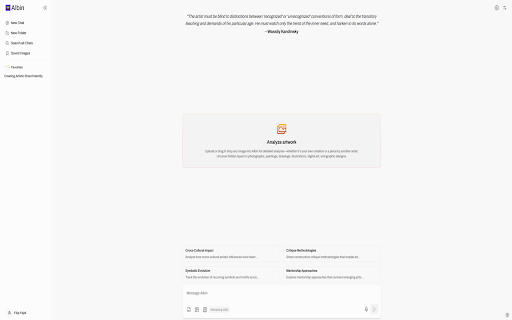
Albin AI for Visual Arts - Chrome Extension Website screenshot

What is Albin AI for Visual Arts ai chrome extension?

Albin AI for Visual Arts is a purpose-built Chrome extension that transforms how creators and art professionals engage with imagery online. Designed as an intelligent companion for visual thinking, it delivers real-time, context-aware analysis of paintings, photographs, digital art, and more—empowering users to decode composition, color theory, stylistic influences, historical references, and conceptual intent with AI-powered precision.

How to use Albin AI for Visual Arts ai chrome extension?

Get started in under 60 seconds: add the Albin AI extension from the Chrome Web Store, create a free account at albin.ai, then simply right-click any image while browsing—whether on museum websites, social platforms, or personal portfolios—and select “Analyze with Albin.” Instantly receive actionable insights, creative suggestions, and learning prompts tailored to your role and goals.

🟢

Albin AI for Visual Arts - Chrome Extension - Key Features

Key Features From Albin AI for Visual Arts ai chrome extension

Style & Technique Decoder — Understand artistic decisions behind brushwork, lighting, and perspective

Portfolio Intelligence — Generate personalized growth recommendations based on your uploaded or analyzed works

Curatorial Insight Engine — Identify thematic connections, period alignments, and narrative cohesion across image sets

Classroom-Ready Art Literacy Tools — Export annotated analyses, comparative studies, and discussion guides for lesson integration

Critique Amplifier — Draft nuanced, research-informed commentary with AI-supported contextual framing and terminology

Albin AI for Visual Arts ai chrome extension's Use Cases

An illustrator refining their visual voice and seeking objective feedback on compositional balance and color harmony

A gallery director curating a contemporary abstraction show and needing cross-artist stylistic mapping

A high school art educator building standards-aligned units using real-world artworks as primary sources

An independent art writer expanding audience engagement through layered, AI-assisted interpretations of trending visuals

🟢

Albin AI for Visual Arts - Chrome Extension - Frequently Asked Questions

FAQ from Albin AI for Visual Arts - Chrome Extension

What is Albin AI for Visual Arts?

Albin AI for Visual Arts is an interactive, browser-native tool that bridges artificial intelligence and human-centered art practice—designed not to replace creativity, but to deepen perception, accelerate learning, and enrich dialogue around visual culture.

How to use Albin AI for Visual Arts?

After installing the extension and signing in, activate analysis with one click—no uploads, no cropping, no waiting. Albin works directly with live web images, preserving context and enabling spontaneous discovery across the digital art ecosystem.

Can Albin analyze any type of image?

Yes—it supports fine art, street photography, generative AI outputs, architectural renderings, fashion visuals, and even screenshots of video stills. Its multimodal understanding adapts to medium, era, and intent without requiring manual tagging or preprocessing.

Is Albin's free plan limited in any way?

The free tier includes full access to core analysis features, up to 10 image analyses per week, and all educational resources. Premium unlocks unlimited analysis, advanced export options, collaborative annotation, and priority model updates—ideal for studios, institutions, and professional practitioners.