AI Maze generator

AI Maze generator: AI Tool for Random Mazes

AI Maze generator: ai tool creating random mazes via recursive backtracking & A algorithm. Download, print, explore—ideal for education, games, projects.

🟢

AI Maze generator - Introduction

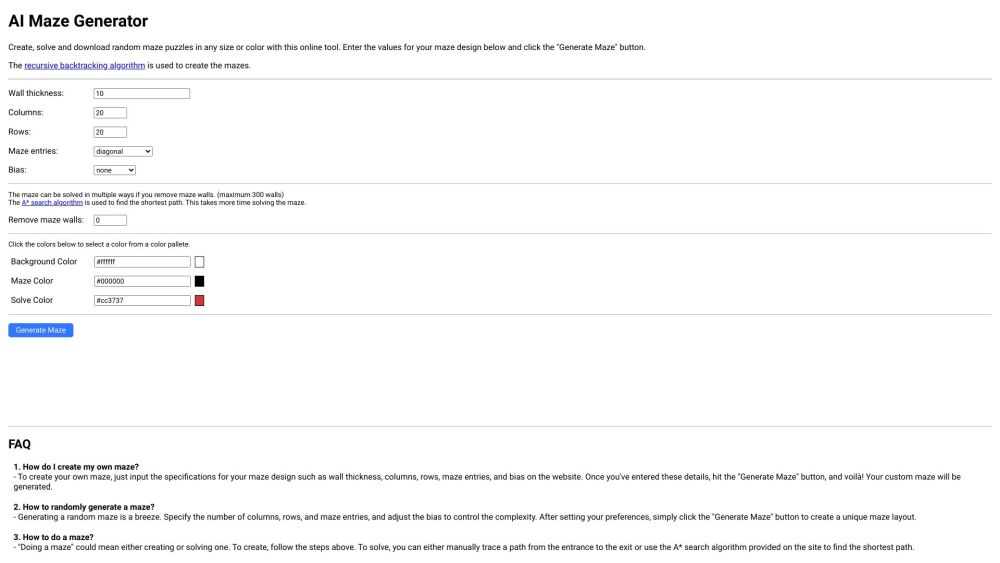
AI Maze generator Website screenshot

What is AI Maze generator?

Discover the power of artificial intelligence with AI Maze generator—a smart, intuitive tool that crafts intricate mazes using advanced algorithms. Whether you're a teacher, game developer, or hobbyist, this platform lets you generate unique maze designs instantly. Built on recursive backtracking for creation and the A* algorithm for solving, it delivers both challenge and creativity in one click. Perfect for printable puzzles, classroom activities, or interactive digital experiences.

How to use AI Maze generator?

Generating your custom maze is simple and fast. Just select your preferred dimensions by setting the number of rows and columns, choose entry points, adjust wall thickness and directional bias, then hit the 'Generate Maze' button. Within seconds, your personalized maze appears—ready to solve, download, or print. You can also explore how the A* algorithm efficiently solves the maze pathfinding in real time.

🟢

AI Maze generator - Key Features

Key Features From AI Maze generator

Smart Maze Generation

Recursive Backtracking Algorithm

A* Pathfinding Integration

🟢

AI Maze generator - Frequently Asked Questions

FAQ from AI Maze generator

What is AI Maze generator?

AI Maze generator is an intelligent online tool that uses algorithmic logic to design random, solvable mazes. It combines recursive backtracking for maze creation and the A* algorithm for solution paths, making it ideal for educational tools, games, and creative projects.

How to use AI Maze generator?

Input your desired maze parameters like grid size, entry/exit points, and visual style, then click 'Generate Maze'. The system will render a fully randomized maze based on your settings, which you can interact with, solve, or export.

How do I create my own maze?

Customize your maze by adjusting rows, columns, wall styles, and generation bias. Once configured, click 'Generate Maze' to produce a uniquely structured puzzle tailored to your specifications.

How to randomly generate a maze?

Set the grid dimensions, define start and end points, tweak the directional bias for varied patterns, and press 'Generate Maze' to receive a fresh, algorithmically-randomized layout every time.

How to do a maze?

To build a maze, configure the settings and generate it. To solve it, either trace the path manually or let the built-in A* solver find the optimal route automatically.

How to draw a maze puzzle?

Use the generator to create your maze, then download the high-quality image file. Import it into any graphic design software for further editing, printing, or inclusion in digital content.

Is the maze free to use?

Yes, the AI Maze generator is completely free to access and use for personal, educational, and commercial purposes—no hidden fees or subscriptions required.