AI Image Generator - Chrome Extension

AI Image Generator - Chrome Extension: ai tool for instant image creation

AI Image Generator - Chrome Extension: A powerful ai tool for instant image creation using cutting-edge models—Product Name.

🟢

AI Image Generator - Chrome Extension - Introduction

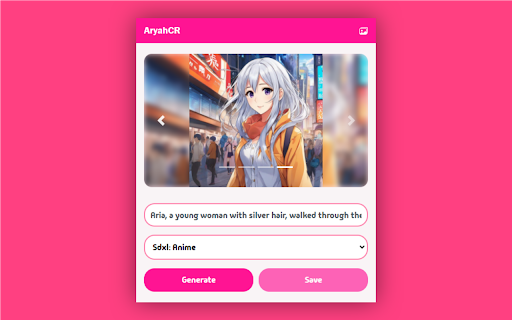
AI Image Generator - Chrome Extension Website screenshot

What is AI Image Generator - Chrome Extension?

A lightweight, browser-native AI image creation tool that brings state-of-the-art generative models—like DALL·E 3 and Stable Diffusion XL—directly into your Chrome workflow. No sign-ups, no tabs, no delays: just instant visual generation from anywhere on the web.

How to use AI Image Generator - Chrome Extension?

Click the extension icon, describe your vision in plain English (e.g., “cyberpunk cat wearing sunglasses, neon-lit alley”), adjust style, resolution, or aspect ratio—and generate in under 5 seconds. Works seamlessly on any webpage, even while browsing, researching, or editing content.

🟢

AI Image Generator - Chrome Extension - Key Features

Key Features From AI Image Generator - Chrome Extension

Dual-Engine AI Architecture

Switch between DALL·E 3 for photorealistic precision and Stable Diffusion XL for artistic flexibility—all within one interface.

One-Click Prompt Enhancement & Refinement

Built-in smart prompt optimizer suggests improvements to boost clarity, detail, and model alignment—ideal for beginners and pros alike.

AI Image Generator - Chrome Extension's Use Cases

Rapid prototyping for designers and product teams

Creating eye-catching thumbnails and banners for YouTube, blogs, and ads

Generating custom illustrations for presentations and internal docs

🟢

AI Image Generator - Chrome Extension - Frequently Asked Questions

FAQ from AI Image Generator - Chrome Extension

What is AI Image Generator?

An ultra-responsive Chrome extension that transforms text prompts into high-fidelity images using industry-leading diffusion and multimodal AI—designed exclusively for speed, simplicity, and creative control.

How to use AI Image Generator?

Install the extension → click its icon → type your idea → tweak settings like quality mode or stylization strength → hit Generate. Your image appears instantly—and you can regenerate, upscale, or download with one tap.

Can I download the generated images?

Yes—every output is automatically available in PNG (lossless) and JPG (optimized) formats, at up to 1024×1024 resolution. Pro users unlock 2048×2048 and batch export.